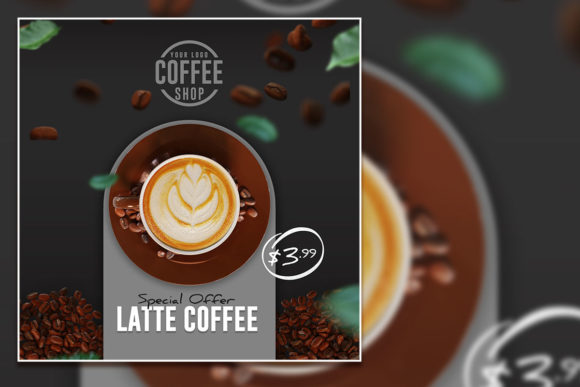
The Coffee Latte Social Media Post Template: A Practical Framework for Better Content
If you’ve ever stared at a blinking cursor or a blank canvas in Photoshop, you know the feeling. The friction isn’t just about creativity—it’s about structure. You know what you want to say, but getting the pixels to do what you want takes time you don’t have. That’s where the Coffee Latte Social Media Post Template changes the game. It’s not just a pretty design file. It’s an operational shortcut for anyone who needs to show up online looking polished, without spending hours hunched over a computer.
Let’s talk about what this thing actually is. It’s a fully layered, fully editable PSD file. We’re talking 100 layers of flexibility, built at 2000 x 2000 pixels with a 300 DPI RGB color profile. That means it’s born ready for the screen but can easily flex into print. The catch? The photos inside are placeholders. They are not included. But honestly, that’s the entire point. You are meant to take this frame and fill it with your own story.
Why “Just a Template” Is Missing the Point
A lot of people hear “template” and assume it means a one-size-fits-all, rigid box. The Coffee Latte template is the exact opposite. Because it comes with 100 separate layers, you can tear it down and rebuild it to match your exact vision. You can change the color of the mug, swap the background texture, adjust the lighting, or swap in a completely different font from the 100% free font list.
The real power here is speed. If you are a freelancer juggling multiple projects, the ability to open a file, drag in your image, and have a finished post in under ten minutes is invaluable. It removes the exhausting “start from scratch” cycle. You get to focus on the message and let the design framework do the heavy lifting.
1. The Busy Freelancer Building Authority
Imagine you are a freelance writer or a life coach. You put out a post every morning. Some days you talk about productivity; other days you share a client win. Consistency is your currency, but you don’t have a marketing team. Using the Coffee Latte template, you create a signature look. You customize the layers once—maybe a warm beige background and your brand font. Every morning, you just open the file, delete the placeholder photo, and drop in a fresh shot of your workspace or a relevant image.
Because it is 100% editable, your feed never looks robotic. You can move elements, change the opacity of a texture, or add a quote overlay. The 300 DPI resolution means that if a client asks you to repurpose that post into a PDF or a printed brochure, it still looks crisp.
2. The Coffee Shop Owner (Or Really Any Local Business Owner)
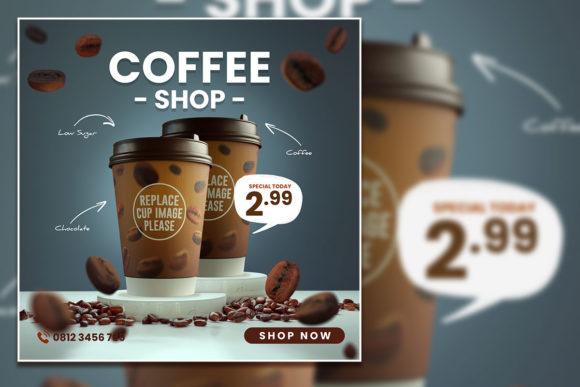
Let’s be literal. If you own a café, this template is practically built for your workflow. You need to promote a new seasonal pumpkin spice latte or a special happy hour. With the 2000 x 2000 pixel format, you are perfectly sized for Instagram square posts and Facebook events.
Here is the scenario: You snap a quick photo of the new latte art on your phone. You open the PSD file on your laptop. You double-click the smart object layer, paste in your photo, and hit save. It takes thirty seconds. The template’s RGB color profile ensures that the warm browns and creamy whites of the coffee look exactly as good on a phone screen as they do on a monitor. If you want to print it as a menu insert, the Print Ready format ensures the colors translate correctly to CMYK.
3. The Social Media Manager Juggling Multiple Brands
Managing three different accounts means you cannot afford to waste a single minute fighting with software. The 100 layers in this PSD file are a godsend for client work. Often, clients will come back and say, “Can we see that with a different texture?” or “Make the background color warmer.”
With a fully layered file, you just click the group you need to adjust. You don’t have to recreate the wheel. You can turn layers on and off to create variations. One post becomes four different options. The fact that it uses 100% free fonts is also a huge relief. You don’t have to worry about your client not having the correct typeface installed. It removes the license headaches that often come with premium design assets.
4. The Hobbyist and Everyday Creator
Not everyone using this template is a professional designer. Maybe you are a parent who wants to make a nice announcement post for a family gathering, or a hobbyist baker sharing your weekend sourdough project. You don’t need to know advanced graphic design. You just need a leg up.
The 100 layers are labeled and grouped logically. You can hide the ones you don’t need and move the ones you do. The fact that it is easily customizable means you can make it look high-end without having a high-end skillset. You avoid the common “templated” look because you are instinctively choosing your own colors and photos.
What You Should Know Before You Jump In
Let’s be upfront so you can use this effectively. The most important thing to understand is that the stock images shown in the preview are placeholders. You have to replace them with your own content. This is actually a strength. Your authentic photos are what make the design work. The template provides the professional framing, but your unique perspective provides the value.
You will need basic access to Adobe Photoshop or a compatible program that handles layered PSD files. Don’t worry—it’s not complicated. If you know how to use the Move Tool and the Layers panel, you are 90% of the way there. The file is structured in a way that encourages tinkering.
Consider your brand’s aesthetic. The Coffee Latte theme leans warm, cozy, and textural. If your brand is neon cyberpunk or minimalist high-tech, you might need to do some heavy customization. It can be done, but it’s worth acknowledging the vibe of the base file. For lifestyle, food, wellness, home decor, and local services, it slots right in.
Connecting Features to Daily Outcomes
It helps to look at the technical specs not as numbers, but as daily advantages.
- 100 Layers: You can make a mistake or change your creative direction without remorse. That texture on the left side? Turn it off. Want a double border? Duplicate the layer. It gives you the freedom to experiment.
- 2000 x 2000 Pixels: This is the sweet spot for most social platforms. It’s big enough to look excellent on retina screens but not so massive that it clogs your cloud storage. It’s also an ideal size for carousel posts.
- 300 DPI & RGB: You rarely get both in a ready-to-use template. The high DPI means if you ever want to blow it up for a poster or a print ad, it holds up. The RGB profile ensures your digital audience sees the vibrant warmth you intended.
- Print Ready Format: This is a sleeper feature. You design a post for Instagram, but then decide to use it for a table tent card or a flyer. Because it’s built to print standards, you don’t have to rebuild it. You just save as a PDF.
- Free Fonts Used: Licensing is a headache. This removes the barrier. You can download the exact fonts used without paying a licensing fee, which means the design integrity stays intact.
Making It Your Own
The best way to use any template is to treat it as a collaborator, not a crutch. Open the file. Look at the layer stacks. See how the designer built the shadows and highlights. You might learn a thing or two just by exploring the groups.
Start with replacing the placeholder images. This is where the magic happens. Drop in your high-quality photos. If you don’t have a professional camera, modern phone cameras work perfectly, especially with the 2000x2000 canvas size. The template is designed to make your photos look like they belong in a magazine spread.
Then, tweak the colors. The RGB profile responds beautifully to color adjustments. Maybe you want a cooler tone for a winter promotion or a sepia vibe for a throwback post. Use adjustment layers within the file to lock in your preferences nondestructively.
Don't be afraid to delete or hide layers. Just because it has 100 layers doesn't mean you must use all of them. Simplicity often reads as more professional. Strip it down to the essential elements that support your message.
The Bottom Line on Useful Design Assets
In a crowded digital world, the tools you choose should save you time and energy. The Coffee Latte Social Media Post Template does exactly that. It takes care of the technical groundwork—the sizing, the resolution, the color profiles, the layer organization—so you can focus on the creative part that actually matters: your content and your connection with the audience.
Whether you are a small business owner rushing to get a post up before opening, a freelancer trying to maintain a professional brand, or a creator who just wants nicer-looking posts, this PSD file gives you a foundation to stand on. Just remember to swap in your own photos. That’s where your story lives.