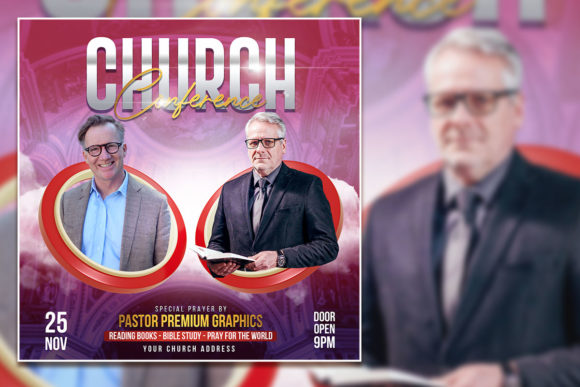
Church Social Media Post Template for Consistent Branding
Creating social media content for a church or faith-based organization comes with unique challenges. You need visuals that feel reverent yet modern, welcoming yet clear, and consistent across every platform without demanding hours of design work each week. That is exactly where a well-built Church Social Media Post Template becomes a practical game-changer. It gives you a structured starting point so you can focus on message and meaning rather than wrestling with software settings or starting from a blank canvas every single time.
What Makes This Template a Useful Creative Tool
The template is a fully layered PSD file built at 2000 x 2000 pixels with a 300 DPI RGB color profile. That resolution alone means you get crisp, high-quality output whether you are posting to Instagram, Facebook, your church website, or even printing flyers for bulletin boards. The 100 layered structure gives you granular control over every element without breaking the design. You can tweak backgrounds, text, imagery placeholders, overlays, and decorative elements independently. This kind of flexibility is rare in pre-built templates, and it matters when you need to adapt a single design for multiple announcements, sermon series, or seasonal campaigns.
The color profile is set to RGB, which is standard for digital screens, so what you see during editing is exactly what your audience sees on their devices. And because the template uses 100 percent free fonts, you avoid licensing headaches. You simply download the fonts listed and start working. No hidden costs, no font conflicts, just a straightforward creative process.
Practical Applications for Different Church Needs
Churches communicate a wide range of messages each week. Sermon graphics, event promotions, volunteer call-outs, Scripture verses, prayer requests, community highlights, holiday services, and ministry spotlights all require distinct visual treatments. A single template that supports easy customization across these categories is invaluable. Instead of redesigning from scratch for every post, you update the text, swap placeholder images, adjust colors to match the season or service theme, and export in minutes.
Sermon Series Branding
One of the strongest use cases is creating a cohesive look for a sermon series that spans several weeks. You can set a consistent color palette, font combination, and visual motif in the template, then generate each week’s post with minimal changes. Your congregation begins to recognize the series instantly in their feed, which builds anticipation and reinforces the message. The layered PSD makes it easy to keep the core branding locked while updating the title, speaker name, date, and featured image for each installment.
Event Promotion and Announcements
From community picnics to Christmas Eve services, events need clear, eye-catching graphics. The template allows you to prioritize different information depending on the event. For a one-time gathering, you can highlight the date, time, and location prominently. For recurring events like youth group or Bible study, you can design a template variation that uses icons or recurring visual cues so followers learn to spot them quickly. The 2000 x 2000 pixel canvas gives you room to include QR codes, registration links, or secondary details without feeling cramped.
Seasonal and Holiday Content
Easter, Advent, Christmas, Lent, and other seasons carry distinct visual traditions. With a fully editable PSD, you can shift from the muted tones of Lent to the bright celebration of Easter in one session. The template structure lets you swap background imagery, adjust overlay opacity, and change accent colors systematically. You do not need to rebuild the layout each time the season changes. You simply adapt the layers that carry the seasonal feel.
Adapting the Template for Different Audiences and Platforms
Not every platform displays your content the same way. Instagram prefers square and vertical formats, Facebook performs well with slightly rectangular images, and your church website might need horizontal headers. The template’s square 2000 x 2000 pixel base is a strong starting point for all of these. You can easily crop or export specific layers to create derivative sizes while keeping your branding consistent. Marketers and communication directors will appreciate that they can maintain a unified visual identity across channels without duplicating effort.
For younger audiences, you might lean into brighter color versions and modern typography from the free font library. For older or more traditional congregations, you can use the same layout but apply subdued tones and classic serif fonts. The template does not dictate a single style. It gives you the framework, and you bring the tone.
How Creators and Designers Benefit from Layered PSD Files
If you are a designer managing social media for multiple church clients or ministries, efficiency is everything. The 100 layered PSD file becomes your repeatable system. You set up master templates for different content types, save variations, and reuse elements across accounts. Because everything is editable, you can adjust layer visibility, blending modes, and opacity to create unique looks while keeping production time low. Print-ready format also means you can output physical materials like posters or postcards from the same file, which is a practical advantage when your client needs both digital and printed collateral.
Entrepreneurs and small business owners who serve church markets, such as Christian authors, speakers, or music artists, can use the template to maintain a professional social media presence without hiring a designer. The editing process is straightforward if you have basic Photoshop skills. You open the file, locate the text layers, type your content, replace the placeholder images with your own, and export. The note about images not being included is important: you provide your own photos, but the template shows exactly where they go, so there is no guesswork.
Keeping Your Results Clear and Consistent
Consistency is one of the hardest things to maintain in church social media, especially when multiple volunteers or staff members contribute content. A standardized template solves this by providing a visual rulebook. When everyone uses the same file structure, font set, and color guidelines, the feed looks cohesive even when different people create posts. You can also save variations as separate PSD files for specific ministries, making it easy for each team to stay on brand.
To keep results effective, follow a few simple practices. Maintain readable contrast between text and background layers. Use the template’s layer organization to keep text placement consistent so your audience knows where to look for key information. Avoid overcrowding the canvas. The template gives you 2000 pixels of space, but that does not mean you have to fill every pixel. White space and balanced composition help your message land clearly.
Practical Tips for Getting Started
When you first open the PSD file, take time to explore the layer structure. Look for folders labeled for text, backgrounds, images, and effects. Rename layers if that helps your workflow. Test different free font combinations from the provided list until you find a pairing that fits your church’s visual identity. Swap in your own images early so you see how the layout responds to real content. Because the template is 300 DPI, you have the option to print materials later without losing quality. Keep a master version of the file with your base branding intact, and save copies for each campaign or season.
If you are working with a team, create a simple style guide that references the template layers. Note which fonts, colors, and image styles you use so everyone can replicate the look. This reduces back-and-forth editing and helps new volunteers contribute quickly. The template becomes not just a design file but a communication tool that aligns your entire team.
Creative Possibilities Beyond the Obvious
The template is not limited to Sunday morning announcements. Consider using it for devotional series, daily Scripture cards, testimonial graphics, staff introductions, or behind-the-scenes looks at ministry life. You can adapt the layered design to create animated versions for Instagram Stories by hiding and showing layers across frames. You can also use the template as a starting point for video thumbnails if your church posts sermons on YouTube. The key is recognizing that a well-structured template supports a wide range of visual communication, not just what you initially planned.
For small businesses and faith-based entrepreneurs, the template offers a professional framework for building brand recognition. An author promoting a new book, a speaker sharing event dates, or a nonprofit highlighting community impact can all adapt the format to their voice. The editable nature means you are never locked into someone else’s vision. You make it yours.
Ultimately, the value of this Church Social Media Post Template comes down to time saved and consistency gained. It removes the repetitive parts of design work so you can focus on the content that actually connects with your audience. Whether you are a seasoned designer or a volunteer stepping into social media for the first time, having a reliable, editable PSD file at your fingertips changes how you approach each post. You work smarter, your feed looks better, and your message reaches people more clearly.