Nikitu Power Point Template: Versatile Design Toolkit
Creating a presentation that looks polished and professional often takes more time than you expect. Between choosing colors, arranging slides, and making sure everything aligns properly, the process can quickly become overwhelming. The Nikitu Power Point Template aims to simplify that experience by giving you a complete set of ready-made slides that you can adapt to your own content without starting from scratch. Whether you are preparing a business proposal, a creative portfolio, or an educational lecture, this template offers a structured yet flexible foundation.
What makes Nikitu Power Point Template stand out
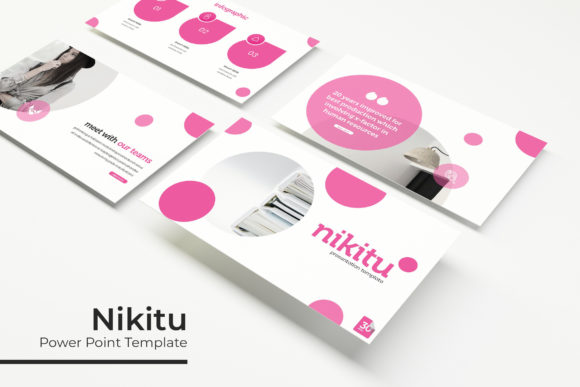
At its core, this template is built around the idea of variety and ease. With 150 total slides spread across five premade color variations, you get thirty slides for each color scheme. That means you are not locked into a single look. If the first color palette does not match your brand or mood, you can switch to another without rebuilding your content. The five color variations give you room to experiment and find the visual tone that fits your message best.
Another defining characteristic is the handcrafted infographic elements included in the PowerPoint files. Instead of using generic shapes or basic charts, these infographics are designed to help you present data, timelines, and concepts in a visually engaging way. For someone who does not have a background in graphic design, having these prebuilt visuals saves a significant amount of effort. You simply drop in your data or text, and the slide already looks thoughtful and intentional.
A closer look at the feature set
Let us walk through some of the specific features that make this template practical for everyday use. The slide deck includes section break slides, which help you divide your presentation into clear parts. This is especially useful for longer presentations where you want to signal a shift in topic or chapter. There are also gallery and portfolio slides, designed to showcase images, projects, or products in a clean layout. If you are a freelancer or a small business owner, these slides can serve as a simple way to display your work without needing a separate portfolio platform.
Every graphic and element in the template is resizable and editable. You are not stuck with fixed dimensions. You can stretch, shrink, or reposition any element to fit your content. Picture placeholders follow a drag-and-drop logic, meaning you can insert an image by simply dragging it into the placeholder area. The template is built on master slides, so any changes you make to fonts, colors, or backgrounds apply consistently across the entire deck. This keeps your presentation cohesive without requiring you to adjust each slide individually.
Pixel-perfect illustrations are another highlight. These are vector-based graphics that remain crisp no matter how much you zoom in or resize them. This attention to detail matters, especially if you are presenting on a large screen or sharing your slides digitally. Blurry or pixelated graphics can distract from your message, and this template avoids that issue by maintaining sharpness across all elements.
Practical applications for different users
The Nikitu Power Point Template is designed to support a wide range of contexts. For entrepreneurs and small business owners, it can be used to create investor pitches, product launches, or quarterly reports. The section break slides allow you to structure your pitch into clear segments like problem, solution, market size, and financials. The handcrafted infographics can help you present market data or growth projections in a way that is easy for your audience to grasp quickly.
Bloggers and content creators might find the template useful for creating brand decks, media kits, or sponsored content presentations. The gallery and portfolio slides work well for showing off photography, design work, or written samples. You can also use the template to create social media slide decks or webinar visuals. Because you have five color variations, you can match the template to your existing brand colors without having to manually adjust every element.
Educational and training contexts
Educators, trainers, and coaches can also benefit from the structured layout. If you are preparing a workshop or a course module, the section break slides help you organize your content into logical parts. The infographics can simplify complex ideas like processes, comparisons, or timelines. For example, if you are teaching a step-by-step method, you can use the prebuilt graphic layouts to illustrate each phase clearly. This approach reduces the cognitive load on your audience and makes your presentation more memorable.
Freelancers and hobbyists who work in creative fields will appreciate the flexibility of the template. You can use the portfolio slides to present your work to potential clients or collaborators. The drag-and-drop image placeholders make it easy to swap out visuals, so you can reuse the same template structure for different projects. Over time, you build a library of presentations that look consistent and professional, which reinforces your personal brand.
What you get in the package
The download includes five PPTX files, each containing a widescreen presentation based on one of the five premade color schemes. You also get a Readme file that explains the basics and provides a link to download the free fonts used in the template. It is worth noting that the fonts are not embedded in the files, so you need to install them separately for the presentation to appear exactly as designed. The font download link is included, and the fonts themselves are free to use, so there is no extra cost involved.
All photographs or pictures shown in the preview are not included in the purchase. They are used solely for illustration purposes. This is a common practice with presentation templates, but it is good to be aware of it upfront. You will need to supply your own images or use stock photos from a free or licensed source. The template provides the placeholders, but the actual content is yours to add.
Things to consider before choosing this template
While the Nikitu Power Point Template offers a lot of flexibility, there are a few practical points to keep in mind. First, the template is designed for PowerPoint, so if you primarily use Google Slides or Keynote, you may need to check compatibility or be prepared to do some manual adjustments after importing. The drag-and-drop functionality and master slide features work best in the native PowerPoint environment.
Second, the five color variations are premade, which saves time, but they may not match your exact brand palette. If brand consistency is critical, you will need to adjust the colors manually. The good news is that because the template uses master slides, you can change the color scheme in one place and have it apply everywhere. This process is straightforward if you have basic familiarity with PowerPoint's slide master view.
Another point to consider is the learning curve for the handcrafted infographics. While they are designed to be easy to use, you still need to understand how to edit text within grouped graphics. If you are completely new to PowerPoint, it might take a few minutes to figure out which elements are grouped and how to ungroup them if needed. The Readme file offers some guidance, but you may also want to look up a quick tutorial on editing grouped objects in PowerPoint.
Who is this template best suited for
This template is particularly well suited for individuals and small teams who need a reliable, good-looking presentation solution without investing hours in design work. If you are a business owner who frequently pitches to clients, a marketer who creates weekly reports, or an educator who builds course materials, the combination of variety and structure will help you stay efficient. The five color variations also make it easy to reuse the same template for different projects or clients, simply by choosing a different color scheme.
For creative professionals and freelancers, the portfolio and gallery slides are a standout feature. They allow you to present your work in a clean, organized format that looks intentional and professional. Even if you do not have a dedicated website for your portfolio, a well-designed PowerPoint slide deck can serve as a powerful offline or downloadable alternative.
Final observations on using Nikitu Power Point Template
When you open the PPTX file for the first time, take a few minutes to explore the slide layouts and understand how the master slides are structured. This initial investment will pay off when you start replacing placeholder content with your own. The template is designed to be intuitive, but a quick review of the slide sorter view gives you a sense of the flow and available layouts.
One practical tip is to choose your color variation before you start adding content. Switching colors later is possible, but it is smoother to make that decision early. Also, decide whether you want to use the section break slides as they are or customize them further. They already contain elegant dividers, but you can add your own icons or text to make them more personal.
The drag-and-drop picture placeholders work well when you insert images that are appropriately sized. Very large image files may slow down the presentation, so consider compressing your photos before adding them. Similarly, the resizable graphics are best used with vector elements, but the template already includes those, so you generally do not need to worry about resolution loss.
Overall, the Nikitu Power Point Template offers a balanced mix of structure, variety, and flexibility. It does not require you to be a design expert, yet it helps you produce a result that looks carefully designed. Whether you are putting together a sales pitch, a class lecture, or a personal project, having a reliable template lets you focus on your message rather than the mechanics of slide building. The 150 slides across five color schemes give you plenty of room to adapt and reuse the template for different purposes over time.
If you are someone who regularly creates presentations and values a consistent, polished look without the overhead of starting from scratch each time, exploring this template is a practical step. Just remember to supply your own images, install the recommended fonts, and spend a few minutes familiarizing yourself with the slide master layout. With those basics handled, you can produce professional presentations that genuinely support your goals.