Maharizz Power Point Template Review: A Versatile 150-Slide Toolkit
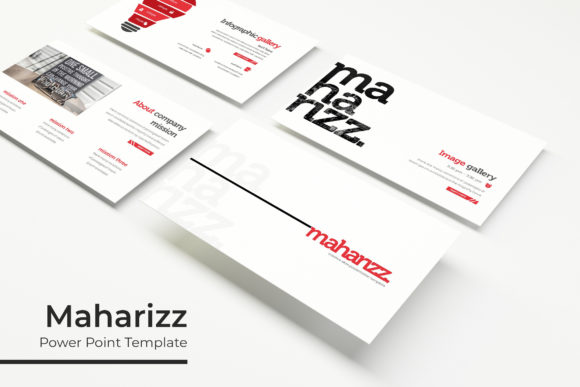
If you have ever spent hours tweaking slide layouts, adjusting colors, or searching for the right visual flow, you know how quickly presentation design can eat into your day. The Maharizz Power Point Template aims to solve that problem head-on. It offers 150 total slides spread across five complete color variations, each with 30 ready-to-use slides. That structure alone hints at the kind of flexibility professionals, educators, and creators often need. Instead of starting from scratch or repurposing the same tired layout, you get a full ecosystem of slides that work together visually and structurally.
What makes this template stand out is not just the volume of slides but the thought behind how they are organized. Each color variation feels like its own distinct theme, yet all follow the same underlying architecture. This means you can switch between color sets without breaking continuity, which is handy when presenting to different audiences or rebranding a pitch deck. Whether you work in marketing, run a small business, or teach courses online, having that level of adaptability saves time and maintains a polished look.
What Exactly Is Inside the Maharizz Power Point Template?
At its core, this is a presentation toolkit built on Master Slides. That technical detail matters because it means you can edit one master slide and have changes ripple across all related slides instantly. You are not manually updating each page. The package includes five separate PPTX files, each in widescreen format, and each with its own pre-made color palette. That gives you 30 slides per file, totaling 150 unique slide layouts.
Beyond the raw count, the template includes handcrafted infographics, section break slides, and dedicated gallery and portfolio slides. These are not generic placeholders. They are designed to be pixel-perfect and resizable, so your content looks crisp whether you present on a laptop or a large screen. The graphic elements are fully editable, and picture placeholders let you drag and drop images directly.
The inclusion of a Readme First file and a free font download link is a small but thoughtful touch. It shows that the creator expects you to actually use the template, not just stare at it. There is no guesswork about which fonts pair well with the design. Everything is laid out clearly.
Why the 5-Color Variation Structure Works Well
Having five color variations built into the template is more than a cosmetic choice. It directly affects how you communicate. A finance presentation might call for conservative blues and grays. A creative portfolio could benefit from warmer, bolder tones. A pitch deck for a tech startup might want clean whites with accent colors. With Maharizz, you are not locked into one palette. You pick the variation that matches your message and your brand.
Each color set contains the same 30 slide types, so you never lose functionality when switching colors. That consistency is valuable for teams who need to maintain a unified look across multiple presentations. If one colleague prefers the dark theme and another prefers the light theme, both can work without sacrificing quality or coherence.
Real-World Uses for Professionals and Creators
Let us talk about practical applications. Imagine you are a marketing manager preparing a quarterly report. You need data-heavy slides with charts, comparison tables, and key takeaways. The handcrafted infographics in this template are not decorative fluff. They are designed to present data visually, which helps your audience grasp trends faster than rows of numbers. You can drop in your own metrics, adjust the graphics, and keep the visual hierarchy intact.
If you are a freelancer or consultant, the gallery and portfolio slides become your best friend. Instead of scattering samples across different pages, you can showcase your work in a structured, visually appealing grid. Clients appreciate that kind of clarity. It signals professionalism without extra effort on your part.
Educators and course creators will find the section break slides especially useful. They provide natural pauses in longer presentations, allowing you to transition between topics smoothly. Students or viewers get a mental reset, and you avoid the monotony of slide after slide of dense text.
Efficiency Gains from Master Slides and Drag-and-Drop Placeholders
One of the most underrated features in any template is how much it reduces repetitive work. The Maharizz Power Point Template is built on Master Slides, which means you can edit headers, footers, logos, or background elements in one place and have them apply everywhere. That is a huge time saver, especially for teams or anyone managing multiple presentations.
The picture placeholders are equally practical. You simply drag and drop an image, and it automatically crops and positions itself within the slide layout. No more resizing, aligning, or guessing if the image fits. It just works. For bloggers, publishers, and digital creators who regularly produce visual content, this streamlined workflow means you can focus on your message rather than the mechanics of slide design.
Resizable and editable graphics are another highlight. If a chart or icon is too small or large, you can adjust it without losing quality. That pixel-perfect attention to detail matters when your presentation is projected onto a large screen or shared as a PDF.
Practical Considerations Before You Dive In
Before you download, there is one important detail to note. The photographs and pictures shown in the preview are for illustration only. They are not included in the package. This is standard practice with premium templates, but it is worth keeping in mind. You will need to supply your own images. That said, the placeholders are designed to accept your images seamlessly, so the final result can look just as polished as the preview.
Also, check the font link provided in the Readme First file. The template uses specific free fonts, and installing them ensures your presentation renders exactly as designed. If you use substitute fonts, the spacing and visual balance may shift. Taking five minutes to install the recommended fonts upfront saves headaches later.
The template works with PowerPoint, and the widescreen format (16:9) is the standard for most modern displays and projectors. If you need a 4:3 ratio, you may need to adjust manually, but for the vast majority of use cases, widescreen is ideal.
Who Benefits Most from This Template
Honestly, anyone who creates presentations regularly will find value here. But a few groups stand out:
- Entrepreneurs and business owners who pitch to investors or clients and need a versatile deck that looks premium without a designer on retainer.
- Marketing and sales professionals who produce multiple presentations per month and need consistency across different campaigns.
- Educators and trainers who build course materials and want to keep learners engaged with varied slide types.
- Freelancers and creative professionals who showcase portfolios and need a clean, visual format that highlights their work.
- Bloggers and content creators who repurpose presentations for social media, YouTube, or webinars.
Even hobbyists who volunteer for community boards or lead local groups can benefit. A well-designed presentation elevates your message, no matter the context.
Final Thoughts on the Maharizz Power Point Template
The Maharizz Power Point Template does not try to reinvent the wheel. Instead, it gives you a well-constructed, thoughtfully organized set of tools that cover the most common presentation needs. The 150-slide count across five color variations provides genuine flexibility. The handcrafted infographics, section breaks, and portfolio slides go beyond basic layouts, offering real utility for data-driven and visual storytelling.
For anyone tired of wrestling with slide formatting or starting from a blank canvas every time, this template offers a practical shortcut. It respects your time, adapts to your brand, and delivers a professional result with minimal friction. That is the kind of tool worth having in your digital toolkit.