Soundfront Keynote Template for Creative Professionals
Presentations are often the first impression of an idea, a brand, or a project. Getting the visual tone right matters just as much as the content itself. Soundfront Keynote Template offers a structured yet flexible foundation for anyone who needs to communicate clearly and creatively. Whether you are pitching a concept, teaching a class, or showcasing a portfolio, this template provides the tools to build something that feels intentional and polished.
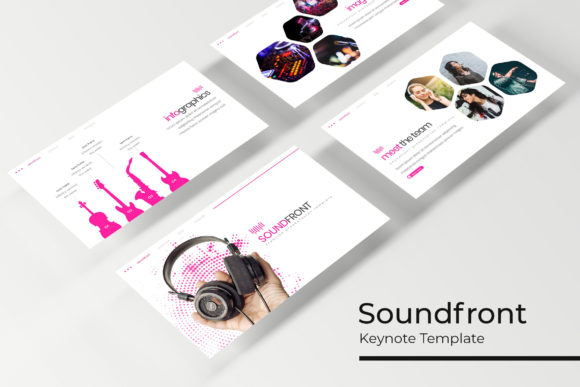
What makes Soundfront stand out is not just the number of slides, but how they are organized. With 150 total slides spread across 5 premade color variations, you are essentially getting five distinct templates in one package. Each variation gives you 30 slides, complete with handcrafted infographics, section breaks, and dedicated portfolio pages. This structure means you can choose a color direction that aligns with your brand or project mood without starting from scratch. The master slides, resizable graphics, and picture placeholders make customization straightforward even if you are not a design expert.
What Soundfront Offers Beyond the Basics
At first glance, a large slide count might feel overwhelming, but Soundfront is designed to reduce friction. The inclusion of 5 PPTX files for each color variation, plus widescreen format, means you can jump into editing immediately. The handcrafted infographic slides are particularly useful if you often present data, timelines, or processes. Instead of building charts from zero, you have a set of visually consistent graphics ready to adapt.
The pixel-perfect illustrations add a layer of polish without requiring additional assets. Picture placeholders with drag-and-drop functionality save time, especially when you need to swap images frequently. The resizable and editable elements give you control over layout details, which is helpful when you need to fit specific content or align with brand guidelines. The included Readme file and free font download link remove common setup hurdles, so you can focus on content rather than technical setup.
Creative Applications Across Different Roles
Soundfront is not limited to one type of user. Its range makes it suitable for several professional contexts, each with distinct needs.
Marketers and Brand Strategists
When presenting a campaign or brand strategy, consistency is key. The premade color variations allow you to test different palettes without rebuilding slides. For example, you might use the cooler tones for a corporate deck and warmer tones for a lifestyle brand presentation. The section break slides help structure longer narratives, making it easier for your audience to follow the journey from research to execution. The portfolio slides also work well for showcasing case studies with before-and-after visuals or key performance metrics.
Freelancers and Creative Entrepreneurs
If you pitch your services or present your work to clients, having a professional deck ready can set you apart. Soundfront gives you a base that looks complete, so you can focus on tailoring the message. You can use the gallery and portfolio slides to display past projects cleanly. The infographic slides help explain your process or pricing structure in a visual way that feels less dense than text-heavy slides. Since the template is resizable, you can adapt it for different client presentations without starting over each time.
Educators and Trainers
Teaching or training sessions benefit from clear visual structure. The section breaks help segment topics, while the infographics can simplify complex ideas. For instance, a lesson plan on digital marketing could use the timeline infographic to show campaign phases. The picture placeholders make it easy to include relevant images or diagrams without distorting the layout. The consistency across slides helps students focus on content rather than being distracted by shifting design elements.
Small Business Owners and Startups
For small teams or solo founders, time is often limited. Soundfront reduces the time spent on design. You can quickly create investor updates, product roadmaps, or team meeting decks using the same template. The 5 color variations let you match your brand colors or explore new directions without extra design work. The portfolio slide is especially useful for showcasing products or services in a structured way that feels professional but not overly complex.
Practical Approaches to Customization
Getting the most out of Soundfront involves understanding how to work with its structure. Here are some practical ways to adapt it for your needs.
Work with Master Slides First
Before editing individual slides, take a few minutes to adjust the master slides. This ensures that fonts, colors, and logo placement stay consistent across all slides. If you are working on a brand presentation, set your brand colors and fonts here. This one step saves time later and prevents inconsistencies from creeping in as you edit individual slides.
Use Picture Placeholders Strategically
The drag-and-drop picture placeholders are designed for speed. When building a portfolio deck, drop your best images into these slots first. The placeholders maintain aspect ratios, so your images stay correctly framed. For a product launch, use the gallery slides to show different angles or use cases. If you are presenting a case study, place screenshots or results graphs in the placeholder areas to keep the slide visual without extra text.
Adapt Infographics for Your Data
The handcrafted infographics are not just decorative. They can be edited to show your specific data points. If you have quarterly sales numbers, use a bar or progress infographic to visualize growth. For process steps, use the timeline or flow infographics. The key is to replace placeholder text and numbers with your own data while keeping the visual structure. This approach turns a generic template into a customized presentation that feels original.
Mix Color Variations for Variety
You are not locked into one color scheme for an entire deck. Soundfront includes 5 premade colors, so you can mix them for different sections. For example, use one color variation for the main body and another for callouts or section breaks. This adds visual variety without breaking consistency, as the slide structure remains the same. Just ensure the contrast between sections is intentional, not random.
Maintaining Clarity and Organization
With 150 slides available, it is tempting to include too much content. However, clarity comes from editing, not adding. Use the section break slides to divide your presentation into logical parts. Each section should have a clear purpose. The portfolio slides work best when limited to a few strong examples rather than everything you have done. The gallery slides are effective for visual impact, but too many images can dilute the message.
When using infographics, focus on one key insight per graphic. Overloading a slide with multiple data points can confuse the audience. The template is designed to support clean communication, so let each slide serve one main idea. If you find yourself adding too much text, consider whether that content might work better as a handout or in the speaker notes.
Suggestions for Different Presentation Formats
Soundfront can be adapted for various formats beyond standard in-person presentations.
For webinars or remote meetings, the widescreen format works well on screens. The clean layout and large image placeholders ensure your content remains visible even when shared in a video call. The section breaks also serve as natural points to pause and engage the audience.
For printed materials, such as handouts or leave-behind documents, the resizable elements let you adjust slides to fit printed page dimensions. The portfolio slides can be repurposed as one-page summaries for clients. The infographics work well in printed form because they convey information at a glance.
For social media or content marketing, you can extract individual slides to use as standalone visual posts. A portfolio slide can become an Instagram carousel. An infographic slide can be shared on LinkedIn as a quick tip. The consistency of the template ensures that any extracted element still feels part of a cohesive brand.
Keeping Your Presentation Audience-Friendly
No matter how polished the design, content must stay accessible. Use the slide layout to guide attention. Place key information in the main content area, and use supporting elements like icons or images to reinforce the message without distracting. The master slides ensure that your typography remains readable across different devices. When adding images, use high-quality files that match the pixel-perfect illustrations to maintain a consistent level of detail.
If you present to non-design audiences, avoid overly dense slides. Soundfront clean structure naturally supports a more minimal approach. You can rely on the visual hierarchy built into the template rather than adding decorations. The goal is to let the audience focus on your message, not on decoding the slide.
Getting Started Without Overthinking
One common hesitation when using a template is the fear of producing something generic. Soundfront avoids this by giving you enough flexibility to make it your own. Start by choosing the color variation that matches your project mood. Then replace the placeholder images and text with your actual content. Use the infographics where they add value, and remove slides that do not serve your narrative. The template is a starting point, not a cage.
The included Readme file and font download link are straightforward, so setup takes minutes rather than hours. Once the basic structure is in place, you can focus on refining the content and flow. The premade color variations also allow you to experiment with different looks for different audiences without starting from zero each time.
Soundfront Keynote Template works well for anyone who needs to produce professional presentations efficiently while maintaining creative control. Its combination of volume, structure, and flexibility makes it a practical tool for a wide range of projects.