Kinara Keynote Template: A Versatile Presentation Toolkit for Professionals
When you need to deliver a clear, compelling message, the visual quality of your slides can make or break your presentation. The Kinara Keynote Template offers a structured yet flexible solution for anyone who regularly builds presentations—whether for client pitches, internal reports, educational materials, or portfolio showcases. With 150 total slides spread across five distinct color variations, this template provides enough raw material to craft nearly any deck without starting from scratch.
At its core, the Kinara Keynote Template is designed to save time while maintaining a polished, professional look. Each of the five color themes includes 30 slides, so you can choose the palette that best fits your brand or topic. Instead of modifying a single set of slides to fit different contexts, you can simply pick the color variant that works and begin populating it with your content. That flexibility is especially valuable for marketers, entrepreneurs, and educators who produce multiple presentations each month.
Handcrafted Infographics That Communicate Data Clearly
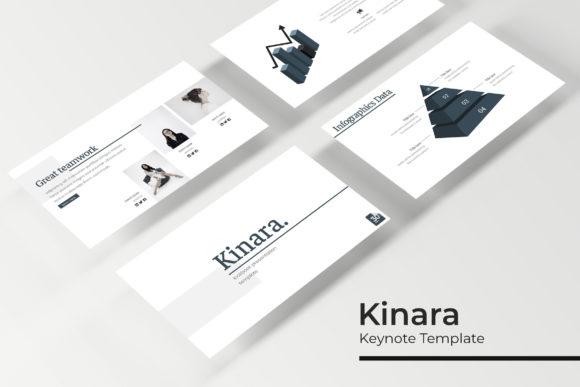
One of the standout features in the Kinara Keynote Template is the set of handcrafted infographic slides. Data visualization can be tricky—poorly designed charts or overcrowded diagrams often confuse audiences rather than enlighten them. The infographics in this template are built with attention to visual hierarchy and clarity. They allow you to present statistics, timelines, process flows, and comparisons in a way that your audience can absorb quickly.
For example, a business analyst preparing a quarterly review can use the infographic slides to map out revenue trends or customer acquisition metrics without needing to design from scratch. The templates are resizable and editable, so you can adjust colors, reposition elements, and swap placeholder data with your own. This blend of ready-made design and full editability means you maintain creative control while cutting down on production time.
Section Break Slides Help You Structure Long Presentations
When a presentation runs longer than a few minutes, audience attention can drift. Section break slides serve as visual pauses that signal a shift in topic or a new phase of your talk. Kinara includes dedicated section break slides within each color theme. These slides typically feature bold typography, contrasting backgrounds, or graphic elements that reset the viewer’s focus.
Consider a training session for new employees. You might have four modules: company history, product overview, sales process, and compliance. Using section break slides between each module gives the trainer a natural moment to pause, and the audience a clear mental transition. For freelancers or consultants who deliver workshops, these slides can also serve as title cards for each chapter of a longer deck, reinforcing a sense of professionalism and organization.
Gallery and Portfolio Slides for Showcasing Work
For photographers, designers, architects, or any professional whose work relies on visual evidence, the gallery and portfolio slides are particularly valuable. Kinara includes layouts specifically designed to present images, projects, or case studies in an attractive grid or carousel format. Picture placeholders allow you to drag and drop your own images directly into the slide, and the master slide setup ensures that every added image maintains consistent spacing and alignment.
Imagine a freelance graphic designer pitching to a potential client. Instead of sending a PDF of works or a link to a website, a well-designed portfolio presentation built with these gallery slides can make a stronger impression during a face-to-face meeting. The ability to add captions, project descriptions, or client logos alongside the visuals adds context and helps tell the story behind each piece. Because the slides are based on master slides, any global changes—like updating a footer or swapping a background—propagate across your entire deck instantly.
Resizable and Editable Graphics Give You Full Control
A common frustration with presentation templates is that elements often lock into place or cannot be resized without breaking the layout. The Kinara Keynote Template addresses this by providing resizable and editable graphics. Every icon, shape, and illustration is built as an object you can move, scale, recolor, or delete. This is a significant advantage for teams that need to adapt a single presentation to multiple scenarios—say, a marketing team repurposing a sales deck for a trade show by swapping out a few graphics and changing the accent color.
The graphics themselves are pixel-perfect illustrations, meaning they retain sharp edges and clarity even when scaled up or down. This technical consistency matters when projecting slides on large screens or printing handouts. For educators who incorporate diagrams and illustrations into lectures, the ability to enlarge a diagram without pixelation ensures that students in the back row can still read labels and details.
Five Color Variations for Brand Flexibility
One of the strongest practical benefits of the Kinara Keynote Template is the inclusion of five premade color variations. Rather than forcing you to redesign a single color scheme, the template gives you five distinct palettes—each contained in its own PPTX file. You might use a blue variant for corporate presentations, a green one for sustainability reports, and a warmer tone for creative pitches. This approach is especially useful for agencies or freelancers who work with multiple clients and need to maintain a consistent structure but change colors quickly.
All five PPTX files are provided in widescreen format, which matches modern projectors and screens. You can also adjust the color of individual elements further if needed, because every shape and text box is editable. The templates are built on master slides, so if you decide to switch from one color variant to another after you’ve added content, you can simply open the corresponding file and paste your text and images. The layout remains the same, but the palette changes instantly.
What’s Included and What You Need to Know
The package contains five separate PPTX files, each representing one of the premade color themes. All files are in widescreen format. A Readme file is included with setup instructions, and a link to download the free font used in the template is provided. This ensures that your presentation looks exactly like the design preview once you install the correct typeface.
It is worth noting that the photographs and pictures used in the preview are not part of the download. They serve as illustration only. You will need to supply your own images, which you can insert into the picture placeholders using drag-and-drop or the standard PowerPoint insert function. For professionals who already have a library of brand photos or stock imagery, this is a minor step that keeps the template affordable and avoids licensing complications.
Who Benefits Most from This Template
While any Keynote or PowerPoint user can find value in the Kinara Keynote Template, certain groups will see the greatest return on the time investment:
- Marketing professionals who produce regular client pitches, campaign overviews, and social media strategy decks will appreciate the ability to switch color themes without rebuilding slides.
- Small business owners and entrepreneurs who need to create professional-looking presentations quickly, often with limited design experience, can rely on the structured layouts and handcrafted infographics to communicate ideas effectively.
- Educators and trainers can use the section break slides and infographics to structure lessons, while the gallery slides work well for student project showcases or conference presentations.
- Freelancers and creative professionals in fields like design, photography, and architecture will find the portfolio-specific layouts ideal for client presentations where visual quality is paramount.
- Corporate teams that require consistency across multiple presentations from different department members benefit from master slides that keep branding elements uniform.
For users who need to deliver presentations in both Keynote and PowerPoint environments, the PPTX format ensures broad compatibility. The template works in PowerPoint 2016 and later, and also opens in Keynote if you prefer Apple’s software—though some advanced features like animation timing may require minor adjustments when switching platforms.
Practical Considerations When Choosing the Kinara Keynote Template
No template is a perfect fit for every situation, and Kinara is no exception. If your presentation relies heavily on embedded video, complex animations, or highly custom interactivity, you may find that some slide layouts are optimized for static content and straightforward transitions. The template excels at providing clean, professional slides for content that is primarily text, images, and data. If you need advanced motion graphics or non-standard aspect ratios, you might need to supplement the template with custom builds.
Also, because the color variations are premade, they offer a limited set of palettes. While you can edit individual colors, the theme is already cohesive. If your brand uses a specific color that does not match any of the five options, you will need to adjust the accent colors manually. That said, the editing process is straightforward thanks to the editable graphics and master slides.
Another consideration is the number of slides. 150 slides across five themes means 30 slides per theme. For a standard pitch deck or meeting presentation, 30 slides are typically sufficient. For larger projects like conference keynotes or multi-day workshops, you may find yourself reusing the same layouts or mixing themes. However, because the styles are designed to be consistent across color variants, you can combine slides from different themes if carefully aligned.
Final Thoughts on Using the Kinara Keynote Template
The Kinara Keynote Template offers a thoughtful balance between structure and flexibility. By providing 150 total slides across five distinct color variations, it lets professionals move quickly from outline to polished presentation while maintaining visual consistency. The handcrafted infographics, section break slides, and portfolio layouts address specific needs that generic templates often overlook. Resizable and editable graphics give you the freedom to adapt every element without breaking the design, and the master slide foundation ensures that changes applied globally stay uniform.
For anyone who creates presentations regularly—whether for a corporate role, a growing business, or a creative side project—this template can reduce the friction of design work and let you focus on the story you want to tell. Just remember to supply your own images and install the recommended font to get the full effect. When used well, the Kinara Keynote Template becomes a reliable tool in your presentation workflow, helping you communicate more effectively with less effort.