Probo Keynote Template: A Versatile Presentation Solution for Professionals and Creators
Creating a presentation that captures attention and communicates ideas clearly is a skill that often depends on the tools you use. Whether you are pitching a business idea, presenting a portfolio, or training a team, the right template can make the difference between a forgettable slideshow and a compelling narrative. Among the many options available, the Probo Keynote Template stands out as a thoughtfully designed system that balances flexibility, visual polish, and practical efficiency. Built around the idea that one size does not fit all, Probo offers multiple color variations, a generous slide count, and a range of content-specific layouts that adapt to different presentation styles.
In this article, we will explore what makes the Probo Keynote Template a practical choice for a wide audience—from entrepreneurs and marketing professionals to designers and educators. We will walk through its core features, discuss where it shines, consider its limitations, and offer guidance on how to decide if it fits your next project.
Understanding the Probo Keynote Template
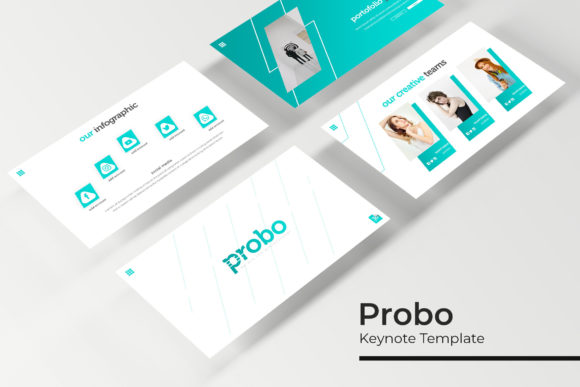
At its heart, the Probo Keynote Template is a comprehensive presentation framework designed for Apple's Keynote application, but it also includes PowerPoint versions for broader compatibility. With a total of 150 slides, it is not a minimal set of a few generic pages, but a full library of well-structured slides organized into five distinct color themes, each containing 30 slides. This modular approach means you can choose a color palette that aligns with your brand or message and still have plenty of layouts to work with.
The template is built on master slides, which ensures consistency across all slides while allowing quick edits. Every element—text boxes, image placeholders, icons, and infographic components—is resizable and editable. The picture placeholders use a drag-and-drop system, so inserting your own images is straightforward and does not break the layout. The graphics are pixel-perfect, meaning they look sharp on retina and standard displays alike.
Five Pre-Made Color Variations, 30 Slides Each
One of the most useful aspects of Probo is the inclusion of five distinct color variations. Each variation is a complete set of 30 slides, so you are not limited to a single scheme. If your brand uses a cool blue palette, one variation may suit you perfectly. If you are preparing a warmer, more energetic pitch, another color option is ready to go. This eliminates the need to manually recolor every slide, saving hours of work. The colors are professionally chosen and balanced, so you can trust that they will look cohesive from the title slide to the closing credits.
Handcrafted Infographics and Section Break Slides
Data-heavy presentations often suffer from cluttered or confusing visuals. Probo addresses this with handcrafted infographic slides that present statistics, timelines, and processes in a clean, easy-to-read format. These are not generic charts; they are designed with narrative flow in mind. Additionally, the template includes section break slides that serve as visual dividers between major parts of your presentation. This structure helps audiences follow your story and gives your slideshow a professional, book-like rhythm.
Gallery and Portfolio Slides
For creatives, the gallery and portfolio slide layouts are a standout feature. Whether you are showcasing product photos, design mockups, or case study images, these slides offer multiple arrangement options that highlight visuals without overcrowding them. The image placeholders are already sized and aligned, so you simply drop in your pictures and the composition remains elegant.
Resizable, Editable Graphics and Vector Icons
Every graphic in the Probo template is fully editable. You can change colors, resize elements, combine icons, or remove components without worrying about resolution loss. The graphics are vector-based, which means they scale cleanly. This is especially valuable when you need to adapt a slide for different display sizes—from a laptop screen to a large conference display.
Comprehensive File Package
When you purchase the Probo Keynote Template, you receive 5 PPTX files (one for each color variation) in widescreen format (5 PPTX Widescreen). The package also includes a Readme file with a link to download the free fonts used in the design. This is a thoughtful addition because missing fonts are a common frustration when opening a template on a different computer. All photographs in the preview are for illustration only and are not included, so you will need to supply your own images to match the final look you want.
Who Can Benefit from the Probo Keynote Template?
The design of Probo makes it suitable for a wide range of professional and creative scenarios:
- Business professionals preparing investor pitches, quarterly reviews, or strategic plans can rely on the clean layouts and data-friendly infographics. The multiple color variations make it easy to align with corporate branding without starting from scratch.
- Marketing and sales teams will appreciate the portfolio slides for case studies and the section breaks for structuring a narrative arc in a client presentation.
- Freelancers and agencies can use Probo for client deliverables, especially when they need to produce a polished presentation quickly. The drag-and-drop image placeholders reduce production time.
- Educators and trainers can benefit from the structured layouts that help organize content into digestible sections, with infographics that simplify complex concepts.
- Event speakers often need a visually cohesive deck that supports their talk without distracting. Probo’s master slide consistency ensures that every slide feels part of the same story.
Real-World Applications and Scenarios
Imagine you are a startup founder preparing a pitch for potential investors. You have a product demo, a market analysis, and a financial forecast. With Probo, you can select the blue color variation for a calm, trustworthy tone. Use the section break slides to separate “The Problem,” “Our Solution,” “Market Opportunity,” and “Financials.” The handcrafted infographic slides turn your market share chart into a visual story that is easy to grasp in seconds. The portfolio slide can showcase your product screenshots cleanly. The entire deck comes together in a fraction of the time it would take to design from scratch.
Another scenario: a graphic designer preparing a portfolio review for a potential client. The gallery slides allow you to display your best work in a grid or mosaic layout. Each image placeholder keeps your images aligned and proportioned, so you do not have to fiddle with alignment for each picture. The editable icons let you add a personal touch, such as customizing service icons for “Branding,” “UX Design,” and “Illustration.”
A marketing manager might use Probo for a quarterly campaign recap. The data slides can present click-through rates and conversion metrics, while the section breaks create a clean transition between channels (Email, Social, Paid Ads). The color variation could be changed to match the brand’s seasonal campaign—no need to rebuild the whole deck.
Strengths
- Time savings: With 150 slides pre-built, you avoid the blank-page paralysis. Most content can be placed by editing existing placeholders.
- Professional consistency: Master slides ensure that fonts, colors, and spacing remain uniform across all slides, even after heavy edits.
- Adaptability: Five color variations give you options without needing design skills. The drag-and-drop image insertion is beginner-friendly.
- Infographic support: Many templates ignore data visuals; Probo includes dedicated infographic slides that are rare in off-the-shelf Keynote templates.
- Scalable files: Vector graphics mean you can adjust sizes without pixelation, and the widescreen format is standard for modern displays.
Considerations and Limitations
- Photographs not included: The preview images are for illustration only. You need to source your own photos, which can be an additional cost or effort if you do not have a library.
- Font installation required: While free fonts are linked, you must download and install them on your computer for the template to render correctly. This is a minor step but easy to overlook.
- Keynote vs. PowerPoint: The template is named “Keynote Template,” but the package includes PPTX files. If you primarily use Keynote, you might find the native .key format more seamless. However, the PPTX files work well in both Keynote and PowerPoint with minor adjustments.
- Learning curve for heavy customization: If you want to change colors beyond the five pre-made variations or rearrange master slide elements significantly, some familiarity with Keynote or PowerPoint’s slide master features is helpful.
- Slide count may be overwhelming: 150 slides is a lot if you only need a simple ten-slide deck. You will end up deleting many slides, but that is still faster than building from scratch.
Guidance for Evaluating Suitability
Before committing to the Probo Keynote Template, consider your specific needs. If your presentations are heavily data-driven and you often present to executives, the infographic and portfolio slides will be a strong asset. If you are a creative professional who values visual polish but lacks design time, the pre-made variations and drag-and-drop placeholders will streamline your workflow. However, if you prefer a minimal, text-only style and rarely use imagery or charts, you might find the template’s complexity unnecessary.
Also evaluate your software environment. If you work exclusively in Keynote and want native compatibility, you may want to check whether the vendor also provides .key files. If you work in PowerPoint, the included PPTX files are ready to use. And if you often present on varied screens—monitors, projectors, tablets—the widescreen format and pixel-perfect graphics will maintain their quality across devices.
Finally, remember that a template is a starting point. The best presentations come from your content and delivery. Probo gives you a solid foundation that lets you focus on your message rather than on design details.
Conclusion
The Probo Keynote Template offers a practical, feature-rich solution for anyone who needs to create professional presentations efficiently. With 150 slides, five color variations, handcrafted infographics, and editable master slides, it addresses common pain points like inconsistent formatting, time-consuming image placement, and lack of visual variety. While it requires you to supply your own photos and install the free fonts, these are minor steps compared to the hours saved in design work. Whether you are pitching a business, showcasing a portfolio, or structuring a training session, Probo provides a versatile framework that adapts to your content and elevates your presentation.