Rose Keynote Template: Design Flexibility Across 150 Slides
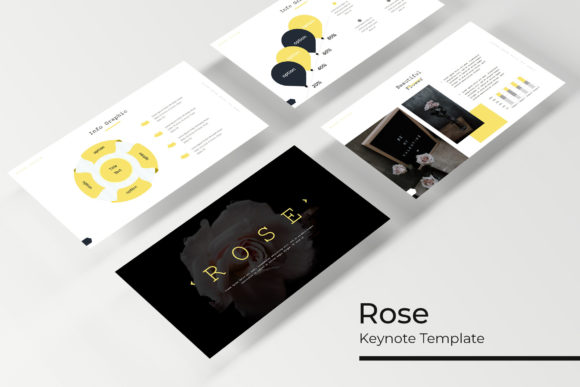
Time is the one resource no creative professional ever has enough of. Especially when building a presentation from scratch. You can spend hours aligning shapes, choosing color palettes, and sourcing icons, or you can start with a system built for speed and flexibility. The Rose Keynote Template is exactly that kind of system. It is not just one look. It provides a total of 150 slides spread across 5 distinct color variations, giving you 30 carefully designed slides for each palette. Whether you are a marketer pitching a new campaign, an entrepreneur seeking funding, or a designer building a portfolio, Rose delivers a cohesive visual language without the usual heavy lifting.
Why 150 Slides? The Power of a Structured Toolkit
The foundation of any great presentation is consistency. Jumbled fonts, mismatched colors, and inconsistent iconography make a deck look amateurish, even if the content itself is solid. Rose solves this by providing five complete template files. Each file contains 30 slides built around a specific color scheme. But the real strength lies in how these slides are constructed.
Every slide is built on Master Slides. This technical detail matters because it saves you hours of manual editing. Need to change the font across all thirty slides? Adjust the master slide. Want to update the color of every title or move a footer? One modification on the master updates the entire deck instantly. You are not editing slide by slide. You are directing the entire visual narrative from a single control panel.
Additionally, the template uses pixel-perfect illustrations. Every vector element is mathematically precise. This means no blurry icons, no stretched graphics, and a crisp appearance on retina screens, projectors, and mobile devices alike. You get professional results without needing a graphic design degree.
Creative Use Cases: Where Rose Makes an Impact
A collection of 150 slides might sound like overkill, but in practice, it is a safety net. You always have the right layout for the right moment. Whether you need a data-driven infographic, a full-bleed portfolio spread, or a subtle section break, the structure is already there.
Building High-Impact Pitch Decks
In a pitch deck, every slide must earn its place. The Gallery and Portfolio slides are ideal for showcasing campaign mockups, case studies, or before-and-after results. The Handcrafted Infographic slides allow you to present metrics like conversion rates, market share, or user growth in a visually compelling way that standard chart tools simply cannot match. The Section Break slides act as natural pauses, signaling a shift from The Problem to The Solution. This pacing keeps your audience engaged and helps them follow your narrative arc.
Crafting a Memorable Creative Portfolio
For photographers, designers, and artists, the way you present your work matters almost as much as the work itself. The drag-and-drop Picture Placeholder feature is a practical time-saver here. You can drop your image directly into the placeholder, and the template automatically masks it into the correct shape and size. You spend your time curating your best projects, not cropping and resizing. The 5 color variations also let you tailor the mood. A dark, elegant palette might suit a luxury brand photographer, while a light, airy palette works better for a wedding planner or lifestyle influencer. Your portfolio becomes a cohesive brand statement, not just a collection of files.
Streamlining Internal Business Reporting
Quarterly reviews, strategy decks, and team updates often suffer from visual fatigue. Employees dread another dense spreadsheet or text-heavy slide. Rose transforms these reports into a visual journey. Use the Infographic layouts to break down complex data into digestible steps. Use the Section Breaks to separate Q1 highlights from Q2 strategy. The consistency of the master slides ensures that even if multiple team members contribute to the deck, the final result looks like it was designed by one person. You can even assign different color variations to different departments for easy organization. Blue for Tech, Green for Finance, Coral for Marketing.
Adapting Color Variations for Different Audiences
Color is a shortcut to emotion. The five premade color palettes in the Rose template allow you to instantly shift the tone of your presentation to match your audience.
- Dark and Elegant: Best suited for luxury brands, high-end product launches, or evening events. It communicates sophistication and exclusivity.
- Light and Airy: Great for wellness coaches, lifestyle bloggers, wedding professionals, or consultants who want to appear approachable and clean.
- Bold and Vibrant: Ideal for tech startups, creative agencies, or educational workshops where energy and innovation are key.
- Soft and Neutral: A safe choice for corporate trainers, financial advisors, or real estate agents who need to appear trustworthy and grounded.
- Warm and Earthy: Works perfectly for sustainable brands, non-profits, or artisan businesses.
Having these options in separate PPTX files means you can start building immediately without needing to manually recolor elements. The hard design work is already done. You simply choose the file that matches your intent.
Practical Workflow Tips for a Polished Result
To get the most out of this template, approach it strategically. Mindlessly adding content to slides can still lead to clutter. Use these techniques to keep your presentation clear, organized, and professional.
- Start with Master Slides, Not Slide One. Before writing a single word, open the Master Slide view. Set your brand fonts and primary colors. This ensures that every slide you build is automatically on-brand. The Readme file included in the download provides direct links to the free fonts used, so you can perfectly match the designer's intent.
- Use Section Breaks as Signposts. Do not treat section breaks as just fancy title slides. Use them to structure your narrative. Each break signals a new chapter to your audience, providing a mental reset. This is especially effective in longer decks like workshops or annual reports.
- Leverage the Picture Placeholders Correctly. The drag-and-drop functionality is designed for speed. Gather all your images in a single folder before you start. Then, drop them into the placeholders directly. Avoid resizing or moving the placeholders unless absolutely necessary, as they are designed for pixel-perfect alignment.
- Customize Infographics for Your Data. The handcrafted infographics are versatile. Use flowcharts for process explanations, timelines for project roadmaps, and icon grids for feature breakdowns. Do not feel limited to using them only for numbers. They work beautifully for illustrating concepts.
- Respect the White Space. One of the strengths of the Rose template is its clean layout. Do not feel tempted to fill every empty area with text or images. White space gives your content room to breathe and makes your key points stand out more effectively.
A Note on Assets and Compatibility
The template package includes 5 PPTX files in Widescreen (16:9) format, which is the standard for modern projectors and monitors. The Readme file clarifies that the photographs used in the demo preview are for illustration purposes only and are not included in the download. This gives you the freedom to use your own high-quality imagery without worrying about licensing conflicts. The template comes with empty, styled placeholders ready for your photos. All free font download links are provided, ensuring your final deck looks exactly as intended without any missing typefaces.
Ultimately, a template like Rose is a productivity partner. It handles the heavy lifting of visual consistency so you can focus on what matters most: your message. Whether you are crafting a pitch that wins a client, a portfolio that lands your dream job, or a report that drives a strategic decision, starting with a structured, adaptable toolkit gives you an immediate advantage. The 150 slides are not just quantity. They are a creative springboard and a safety net, ensuring you always have the exact layout you need for the impression you want to make.