Hobend Power Point Template: 150 Slides of Premium Design
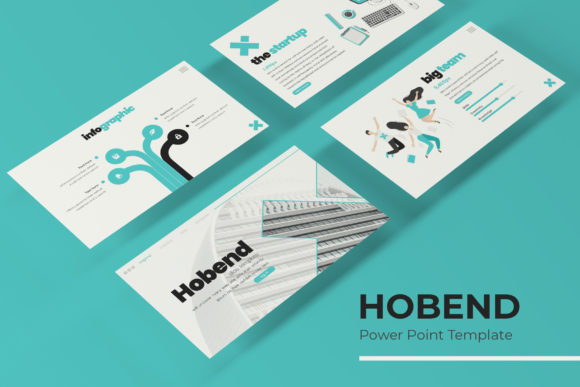
If you’ve spent any time building presentations, you know the struggle: too many templates feel either rigid or chaotic. Some lock you into a single color scheme. Others give you so much freedom that nothing looks consistent. The Hobend Power Point Template sits in a sweet spot between structure and flexibility. With 150 total slides across five premade color variations—30 slides per template—it’s built for people who need to move fast without sacrificing visual quality.
This isn’t a one-size-fits-all deck. It’s a system of five distinct PPTX files, each with its own color story, yet tied together by the same pixel-perfect illustration style and master slide architecture. Whether you’re a marketer pitching a campaign, an entrepreneur building investor materials, or a designer creating a portfolio, Hobend gives you a consistent foundation without feeling repetitive.
What Makes Hobend Different from Other Presentation Templates
Most presentation templates offer a handful of slide layouts and call it done. Hobend takes a different approach. Each of the five color variations includes 30 fully crafted slides, covering section breaks, galleries, portfolio pages, infographics, and content layouts. That means you get 150 unique slides in total—enough to build multiple decks without starting over.
The handcrafted infographics deserve special attention. Instead of generic charts and graphs, you get visually distinct data displays that feel editorial. They work well for metrics, timelines, comparisons, and process flows. If you’ve ever struggled to make numbers look engaging, these infographics give you a head start.
Another standout feature is the section break slides. These aren’t afterthoughts. They’re designed to give your presentation breathing room, creating natural pauses that help your audience absorb information. In longer decks—think 40, 60, or 90 slides—those breaks make a real difference in retention.
Five Color Variations, One Cohesive System
Hobend comes with five premade color schemes, each saved as a separate PPTX file. You’re not manually swapping colors and hoping things align. Open the file that matches your brand or project mood, and every slide is already color-consistent. The five variations cover a range of tones—from neutral and professional to bold and creative.
This color system is ideal if you work with multiple clients or brands. You can reuse the same structural templates across projects, simply selecting the appropriate color variation. It also helps when pitching different concepts to the same client. Show them the same content in two color directions and let the visual hierarchy do the persuading.
Because everything is built on master slides, changing a headline font or adjusting a color globally takes seconds. If you’re collaborating with a team, that consistency matters. No one has to manually update each slide.
Gallery and Portfolio Slides That Actually Look Good
One area where many presentation templates fall short is image handling. Hobend includes dedicated gallery and portfolio slides with built-in picture placeholders. You simply drag and drop your images—no cropping, no alignment headaches. The placeholders are resizable and editable, so you can adapt them to landscape, portrait, or square images without breaking the layout.
For photographers, designers, architects, or anyone whose work depends on visual impact, these slides are the most valuable part of the deck. The layouts are clean enough to let your images lead, but structured enough to keep the presentation cohesive. If you’ve ever tried to build a portfolio in standard presentation software, you know how rarely that balance works out of the box.
Practical Applications Across Projects
Hobend works well beyond the typical business pitch. Here are a few where I’ve seen it shine:
- Editorial design proposals – The clean layouts and section breaks make it easy to present magazine spreads, content strategies, or brand guidelines.
- Social media content plans – The gallery slides double nicely as mockups for Instagram grids, Facebook campaigns, or LinkedIn carousels.
- Publishing and ebook decks – If you’re pitching a book concept or a content series, the consistent visual hierarchy helps your ideas come across clearly.
- Small business brand kits – Use the five color variations to show a client how their brand could look across different tones. It’s a great selling tool without being salesy.
- Creative portfolios – The portfolio slides are built for impact. Let your work speak, while the template keeps everything polished.
Readability, Visual Hierarchy, and Professionalism
Templates don’t guarantee good design, but Hobend gives you a strong starting point. The pixel-perfect illustrations and consistent spacing help you maintain visual hierarchy without micromanaging every element. Your headlines stay prominent. Your body copy stays readable. Your images stay the focal point.
That consistency does something subtle for brand perception. When every slide feels like part of the same deck—not a collection of borrowed layouts—your audience picks up on the professionalism. It signals that you’ve put thought into how your message is received. For entrepreneurs pitching to investors or marketers presenting to clients, that signal matters.
The font choices you make within the template will amplify or weaken that effect. Hobend uses clean, modern typography by default, but the master slides make swapping typefaces easy. If you want to pair a bold display font for headlines with a neutral sans serif for body copy, the template supports that without breaking alignment.
Choosing the Right Color Variation for Your Project
With five premade colors available, picking the right one is about matching the tone of your content. A conservative financial pitch might call for the neutral or dark variation. A creative agency portfolio could lean into the bolder palette. A nonprofit presentation might benefit from the lighter, more approachable colorway.
If you’re unsure, test the same content in two variations. The visual difference can change how your message lands. I’ve seen a single deck go from feeling corporate to feeling warm just by switching color files. That flexibility is valuable when you’re iterating on a pitch or adapting a presentation for a different audience.
Also worth noting: the template includes a “Read Me First” file with a link to download the free fonts used. Always grab those fonts before you start editing. It saves time and prevents formatting surprises when you share the file with someone else.
What’s Included and What’s Not
Here’s the full package inside Hobend:
- 5 PPTX files (one for each premade color)
- 5 PPTX widescreen files (same colors, 16:9 format)
- 30 slides per template, totaling 150 slides
- Handcrafted infographics
- Section break slides
- Gallery and portfolio slide layouts
- Resizable and editable picture placeholders (drag-and-drop ready)
- Master slide-based architecture
- Pixel-perfect illustrations
- Read Me First file with font download link
One important note: the photographs and images shown in the preview are not included. They’re for illustration only. That’s standard for premium templates, but it’s worth knowing upfront. You’ll need to supply your own imagery—which, honestly, is better for originality anyway.
Practical Guidance for Getting the Most Out of Hobend
Don’t just open a file and start filling slides. Take 15 minutes to review all 30 layouts in your chosen color variation. See which ones fit your content and which you can skip. The section breaks, for example, work best when you have substantial content between them. If your deck is only 12 slides, you might only need one or two breaks.
Use the infographics intentionally. If you have data, lead with the visual story. If you don’t have data, don’t force an infographic just because it’s there. Empty data slides weaken a deck. The template gives you options—exercise the ones that serve your message.
For the portfolio slides, crop your images before dropping them into the placeholders. Even though the template handles alignment, starting with well-cropped images saves you from awkward adjustments later. And because the placeholders are editable, you can resize them to create visual variety without breaking the grid.
Licensing and What You Can Do with It
Hobend comes with commercial licensing, meaning you can use it in client work, branded presentations, and commercial projects. You cannot redistribute the template files themselves. If you’re a designer building decks for multiple clients, this is a solid asset to keep in your toolkit.
The free font download link included in the Read Me First file covers the specific typefaces used in the template. Make sure to read the font licenses separately—some free fonts have restrictions on commercial use or embedding. It’s a small step that prevents legal headaches later.
Templates like Hobend are design assets, not shortcuts. They give you a foundation so you can focus on content, messaging, and audience engagement. If you invest the time to customize them well, the result looks anything but templated.