Real Estate House Social Media Post: A Complete Guide for Creators
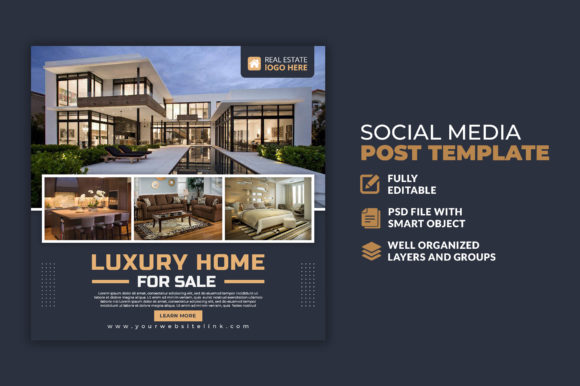
Creating visual content for real estate listings used to mean hiring a designer or learning complex software from scratch. That has changed significantly with ready-made templates designed specifically for the industry. A Real Estate House Social Media Post template is a pre-designed, fully editable file that helps you produce professional-looking property posts without needing advanced design skills. These templates typically come in a standard square format, often 1080×1080 pixels, and are built in layers so you can customize every element to match your brand or listing.
The appeal of these templates lies in their balance between structure and flexibility. You get a polished layout, typography choices, and visual hierarchy already figured out, but you retain full control over colors, text, and images. For anyone in real estate marketing, this means you can go from idea to published post in minutes rather than hours.
What You Actually Get in a Real Estate Post Template
Most high-quality templates include multiple layers within a Photoshop PSD file. Each layer represents a separate element of the design, such as the background, text boxes, photo placeholders, icons, and decorative graphics. Because these layers are organized, you can turn elements on or off, reposition them, or change their appearance without affecting the rest of the design.
A typical template might include space for a property photo, the listing price, key features like number of bedrooms and bathrooms, a call to action such as "Schedule a Viewing," and your agency logo. The text layers are fully editable, meaning you can click directly on the text and type your own information. Some templates also offer multiple color schemes or style variations built into the same file, giving you creative freedom without starting from scratch.
One important detail to note is that images are not included. The template comes with placeholder boxes where you insert your own property photos. This is standard practice and actually works in your favor since you will always want to use real images of the properties you are promoting.
Why the 1080×1080 Pixel Size Matters
Social media platforms like Instagram, Facebook, and LinkedIn display square images most consistently. The 1080×1080 pixel dimension ensures your post looks sharp on both mobile devices and desktop screens. This size is large enough to retain quality when compressed by social media algorithms yet compact enough to load quickly on slower connections. Using this standard size means your posts will fit perfectly in feeds, grids, and even story highlights if you repurpose them later.
Who Benefits from Using These Templates
The real value of a Real Estate House Social Media Post template becomes clear when you consider the range of people who need consistent, attractive property visuals. Real estate agents and brokers are the obvious primary users. They often need to post multiple listings per week, and designing each post individually would be impractical. With a template, they can maintain a cohesive brand identity across all their listings while saving enormous amounts of time.
But the usefulness extends beyond agents themselves. Marketing teams at real estate agencies use these templates to ensure all team members produce on-brand content. Property developers and investors who market new builds or rental units also benefit from having a professional template they can reuse for each property. Even freelance content creators who manage social media for real estate clients find these templates to be reliable tools that streamline their workflow and reduce repetitive design work.
For beginners who are just starting out in real estate marketing, these templates serve as a learning tool. By working with a layered PSD file, you begin to understand design principles like spacing, font pairing, and color harmony without needing formal training. You can experiment freely because the original design is always preserved in the layers, so there is no risk of ruining the template.
Common Goals These Templates Support
- Brand consistency: Using the same template across all posts ensures your visual identity remains recognizable.
- Speed of execution: A well-organized template can be edited and published in under ten minutes.
- Professional appearance: Even with minimal design experience, you produce results that look polished and credible.
- Scalability: As your number of listings grows, templates allow you to scale your content production without hiring additional help.
Practical Ways to Use a Real Estate Post Template
Most people think of these templates solely for Instagram or Facebook posts, but their use cases are broader. Here are some realistic scenarios where a template becomes genuinely useful:
Listing launches: When a new property hits the market, you want to create buzz. A template lets you quickly produce a post that highlights the best photo, key selling points, and a clear call to action. You can schedule these posts to go live the moment the listing goes public.
Open house announcements: You can repurpose the same template by swapping the main image and updating the text with open house dates and times. The consistent layout means your audience recognizes your posts instantly as they scroll through their feed.
Sold or pending updates: Celebrating a sale is a great way to show activity and success. Adjust the template to include a "Sold" badge or overlay, and share the good news with your network.
Neighborhood highlights: Real estate marketing is not only about individual properties. You can use the template to showcase local amenities, school districts, or market trends. Just replace the property photo with a relevant image and adjust the text accordingly.
Client testimonials: A template can be adapted to feature a quote from a happy client alongside their photo. This adds social proof to your feed and builds trust with potential buyers and sellers.
Beyond Social Media Posts
The same template file can serve purposes beyond standard feed posts. Because it is a high-resolution PSD, you can resize it for use in email newsletters, blog headers, or even printed flyers with minor adjustments. The layers make it straightforward to create variations for different platforms while keeping the core design intact. This flexibility makes the template a multi-purpose asset rather than a single-use tool.
Important Considerations Before Choosing a Template
Not all templates are created equal, and a few key factors will determine how useful a specific template is for your needs. The first is the level of organization within the PSD file. A well-organized template has clearly named layers and groups, and ideally includes a guide or readme file explaining how to use it. If the layers are messy or unnamed, editing becomes frustrating even for experienced users.
Another factor is font usage. Many templates specify free fonts that you can download and install. Before purchasing or downloading a template, check which fonts are required and confirm that they are indeed free for commercial use. The last thing you want is to build a brand identity around a font that later requires an expensive license.
Consider the design style as well. Real estate templates range from modern and minimalist to bold and text-heavy. Choose a style that aligns with the type of properties you market and the preferences of your target audience. A luxury condo building will benefit from a clean, elegant design, while a family home might suit a warmer, more approachable layout.
Practical Tips for Getting the Most Out of Your Template
- Spend time customizing the colors to match your brand palette before you start creating individual posts.
- Save your edited version as a master template so you do not have to redo the branding setup for each new listing.
- Use high-quality images that are well-lit and properly cropped to fit the photo placeholders.
- Keep text concise. Social media users skim quickly, so highlight only the most important information.
- Test your post on mobile before publishing. What looks good on a large monitor may appear cluttered on a small screen.
Why Templates Remain Relevant in a World of Design Apps
With the rise of mobile design apps and browser-based tools, some people question whether traditional PSD templates are still useful. The answer is yes, especially for those who want precise control over their designs. Photoshop remains the industry standard for professional graphic design, and a layered PSD file offers a level of detail that many online tools cannot match. You can adjust kerning, apply layer styles, use masks for complex edits, and incorporate custom graphics seamlessly.
For real estate professionals who work with branding guidelines, having a PSD file means they can adhere to exact color codes, font sizes, and spacing requirements. This precision is difficult to achieve with drag-and-drop apps that limit customization options. The template becomes a reliable foundation that ensures every post, regardless of who creates it, meets the same quality standards.
A Realistic Look at the Learning Curve
If you have never used Photoshop before, a layered template is actually a gentle introduction to the software. Because the design is already complete, you only need to learn a few basic actions: opening the file, selecting the correct layer, editing text, and replacing images. Most templates come with instructions, and there are countless free tutorials online that cover exactly these skills. Within a few hours of practice, even a complete beginner can produce a finished post.
For those already comfortable with Photoshop, a well-organized template saves the repetitive work of building layouts from scratch. You can focus your energy on curating great images and writing compelling copy instead of worrying about alignment and spacing.
Final Thoughts on Choosing the Right Template
The best Real Estate House Social Media Post template for you is one that matches your skill level, your brand identity, and the volume of content you need to produce. Look for files that are described as 100 percent layered, full editable, and easy to customize. Check that the resolution is 1080×1080 pixels so your posts display correctly on all platforms. Verify that the fonts are free and that the layers are well organized.
Remember that the template is a starting point, not a finished product. Your choice of images, the clarity of your message, and how well you connect with your audience will ultimately determine the effectiveness of your posts. A good template removes the technical barriers and lets you focus on what matters most: showcasing properties in a way that attracts attention and drives action.