Penyon Keynote Template: A Comprehensive Look at Its Design, Features, and Practical Applications
If you have ever spent hours aligning text boxes, resizing images, or wrestling with inconsistent slide layouts, you know how much a well-structured presentation template can change your workflow. The Penyon Keynote Template is one of those resources designed to reduce friction and help you focus on your message rather than the mechanics of slide building. With 150 total slides spread across five color variations, each containing 30 slides, this template offers a substantial library of layouts and design elements that can be adapted for a wide range of presentation needs. In this article, we will walk through what makes Penyon stand out, where it shines, and what you should consider before using it for your next project.
What Is the Penyon Keynote Template?
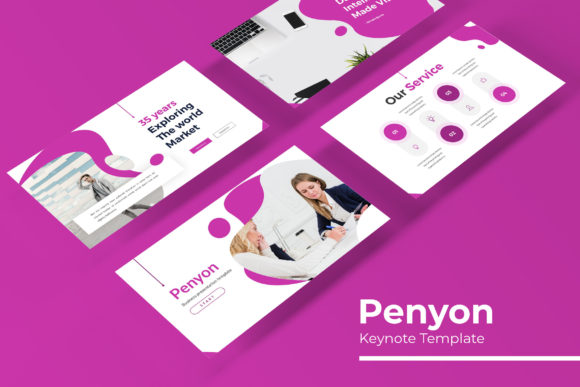
Penyon is a comprehensive Keynote template built around a modular, master-slide-based architecture. It comes with five distinct PPTX files—each representing a different color variation—so you are not locked into one aesthetic. Every file contains 30 slides, which means you get a total of 150 unique slide layouts to work with. The template also includes handcrafted infographics, section break slides, gallery and portfolio layouts, and pixel-perfect illustrations that are resizable and editable. The overall design is polished and professional, suitable for both internal team meetings and high-stakes client presentations.
What sets Penyon apart from many other templates is its emphasis on flexibility. Instead of forcing you to work within rigid layouts, the template uses Master Slides, which allow you to globally change fonts, colors, and backgrounds across your entire presentation in seconds. Picture placeholders use a simple drag-and-drop system, so you can swap visuals without breaking the layout. Whether you are a seasoned presenter or someone who only builds slides once a quarter, this template aims to simplify the process without compromising on visual quality.
Key Features That Define the Experience
Let us break down the core features that make Penyon a notable option for presentation design. Understanding these elements will help you decide whether the template aligns with your workflow and presentation goals.
150 Total Slides Across 5 Color Variations
The sheer volume of slides is one of Penyon's most obvious strengths. With 30 slides per template and five color variations, you are essentially getting five different presentation sets in one purchase. This is particularly useful if you manage multiple brands, clients, or departments and need a consistent visual language that adapts to different guidelines. Each color variation is fully fleshed out, meaning you do not have to manually swap color palettes or worry about mismatched elements.
Handcrafted Infographics
Data visualization can make or break a presentation. Penyon includes handcrafted infographics that go beyond basic charts. These are designed to communicate information visually without overwhelming your audience. Whether you are presenting survey results, process flows, or comparative data, the infographic slides give you a head start. Because they are editable, you can adjust shapes, text, and colors to match your specific data set. This is a significant time-saver compared to building diagrams from scratch.
Section Break Slides and Gallery/Portfolio Layouts
Structure and flow are critical in longer presentations. Penyon includes dedicated section break slides that help you signal transitions between topics. These are visually distinct from content slides, giving your audience a mental pause and reset. Additionally, the gallery and portfolio slide layouts are designed to showcase images, projects, or team members in a clean, grid-based format. If you work in creative fields, real estate, or product marketing, these layouts will feel immediately useful.
Resizable and Editable Graphics with Picture Placeholders
One of the most frustrating aspects of using templates is discovering that an element cannot be resized or recolored without breaking the design. Penyon's graphics are vector-based and pixel-perfect, meaning you can scale them up or down without losing quality. Picture placeholders are set up for drag-and-drop use. You simply drag an image into the placeholder, and it snaps into position. This eliminates manual cropping and resizing, which is especially helpful when you are working with a large volume of images.
Based on Master Slides
Master Slides are the backbone of any efficient presentation workflow. Penyon leverages this feature fully, allowing you to make global changes to fonts, colors, and backgrounds that propagate through the entire deck. If your client suddenly decides they want a different accent color, you can update it once and be done. This is a huge advantage over templates that rely on manually placed elements, which require you to edit each slide individually.
Who Can Benefit from Using Penyon?
Penyon is not a one-size-fits-all solution, but it does cover a broad range of use cases. Here are the profiles that are most likely to get value from this template.
- Business professionals and executives who need to create polished quarterly reports, strategy overviews, or boardroom presentations. The professional layouts and infographics help convey complex information clearly.
- Creative professionals and agencies such as designers, photographers, and marketing teams. The gallery and portfolio slides are tailored for visual storytelling, making it easy to present work samples in an attractive layout.
- Entrepreneurs and small business owners who wear many hats and cannot afford to spend hours formatting slides. Penyon's drag-and-drop functionality and prebuilt color schemes reduce the time investment significantly.
- Educators and trainers who deliver structured content over multiple sessions. The section break slides and hierarchical layouts help organize material logically.
- Freelancers and consultants who work with multiple clients and need to maintain a consistent yet adaptable brand presence across presentations.
Where Can You Use Penyon Effectively?
The template's versatility means it can be applied in various contexts. Here are some real-world scenarios where Penyon performs well.
Client pitches and proposals. The portfolio and gallery slides allow you to showcase past work or case studies in a visually appealing format. The section break slides help you transition from problem to solution to pricing without losing narrative momentum.
Internal training and onboarding. The handcrafted infographics and process-oriented layouts are ideal for breaking down workflows, explaining policies, or illustrating organizational structures. The consistent color coding across slides helps learners follow along.
Conference presentations and keynote speeches. The clean, readable typography and high-contrast layouts work well on large screens. The five color variations give you the ability to match event branding or your own corporate identity.
Product launches and marketing decks. With dedicated slides for product features, benefits, and visuals, Penyon can serve as a foundation for a compelling product story. The drag-and-drop image placeholders make it easy to insert product shots or mockups.
Strengths and Practical Considerations
No template is perfect for every situation. Here is a balanced look at what Penyon does well and where you might encounter limitations.
Strengths
- Volume and variety. 150 slides across five color schemes give you more than enough material to build a comprehensive deck without repetition.
- Global editing via Master Slides. You can change fonts, colors, and backgrounds in one place, which saves time and ensures consistency.
- Editable vector graphics. Scaling, recoloring, and repositioning elements is straightforward, which is not always the case with raster-based templates.
- Drag-and-drop image integration. The picture placeholders reduce the friction of inserting and aligning images.
- Included Readme and font links. The template comes with a Readme file that includes links to download the free fonts used, so you can match the design exactly without hunting for resources.
Considerations and Limitations
- Learning curve with Master Slides. If you are not familiar with how Master Slides work in Keynote or PowerPoint, you may need to spend some time learning the basics before you can fully leverage this feature.
- Preview images not included. The photographs used in previews are for illustration only. You will need to source your own images, which adds an extra step if you do not have a library ready.
- Requires Keynote or PowerPoint. The template is delivered as PPTX files. While this is standard, users of other presentation software may need to convert files, which can sometimes cause formatting shifts.
- 5 color variations may not cover all brand needs. While five schemes offer good variety, if your brand uses a very specific color palette not represented, you will need to do some custom color work.
How to Evaluate Whether Penyon Is Right for Your Project
Before committing to any template, it helps to ask a few targeted questions. Here is a simple framework you can apply.
- What is the primary purpose of your presentation? If you are building a data-heavy report, the infographic slides will be valuable. If you are presenting a creative portfolio, the gallery layouts will serve you well. If you need a mix of both, Penyon covers that ground.
- How much time do you have to customize? The template is designed to be used out of the box with minimal adjustments. However, if you plan to heavily customize colors, fonts, or layouts, factor in additional setup time.
- Who is your audience? The design leans professional and polished, which works for corporate and creative contexts. If your audience expects a more minimalist or highly experimental look, you might need to modify the template accordingly.
- Do you need multiple variations? If you present to different clients or departments, the five color schemes allow you to adapt quickly without rebuilding from scratch.
Final Thoughts on Penyon Keynote Template
Penyon is a robust, thoughtfully structured template that prioritizes efficiency and visual consistency. Its 150-slide library, five color variations, and Master Slide architecture make it a practical choice for professionals who need to produce quality presentations without reinventing the wheel. The handcrafted infographics, section break slides, and gallery layouts cover a broad range of use cases, from business reporting to creative showcases. While it does require some familiarity with Master Slides and relies on users supplying their own images, the overall package offers substantial value for anyone who regularly builds presentations. If you are looking for a template that balances flexibility with a polished, ready-to-use aesthetic, Penyon is worth considering for your next project.