Moencak Google Slide Template: A Comprehensive Tool for Polished and Versatile Presentations
Creating a presentation that captures attention, communicates clearly, and leaves a lasting impression is no small task. The visual backbone of your slides often determines whether your message lands or gets lost. The Moencak Google Slide Template is designed to address this challenge directly, offering a structured yet flexible framework that helps you build professional decks quickly. Whether you are preparing a business pitch, a portfolio showcase, or an educational module, understanding what this template offers—and where its limits lie—can save you time and effort.
What Is the Moencak Google Slide Template?
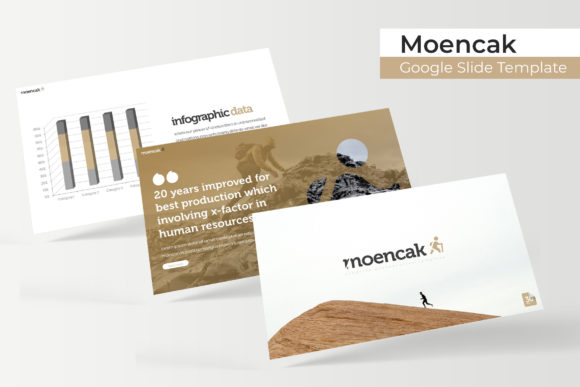
At its core, the Moencak Google Slide Template is a presentation package built to run within Google Slides. It is composed of 150 total slides organized into 5 premade color variations, each containing 30 slides. This means you get five distinct aesthetic directions out of a single template family, without needing to rebuild your content from scratch each time. The template includes a range of slide types—section breaks, infographic layouts, gallery and portfolio slides, and standard content pages—giving you a toolkit that works across different presentation styles.
What makes Moencak stand out is its reliance on Master Slides. Every layout is anchored to these master layers, which means any global change you make—such as adjusting a font or repositioning a footer—applies automatically across all slides that share that master. This is a time-saver for anyone who has ever had to manually update a presentation slide by slide.
Key Features at a Glance
The feature set of this template is practical rather than flashy. It focuses on reducing friction during the design process and giving you a solid starting point. Here is what you can expect:
- 150 total slides across 5 color variations: Each color variation contains 30 slides, so you can pick the palette that fits your brand or mood. The colors are premade but fully editable.
- Handcrafted infographic layouts: The template includes infographic-style slides that help you present data, timelines, and processes without needing to design from scratch.
- Section break slides: These are designed to separate major segments of your presentation, giving your audience a natural pause and visual cue that a new topic is starting.
- Gallery and portfolio slides: If you need to showcase images, screenshots, or project samples, these layouts provide clean grids and placeholder areas.
- Resizable and editable graphics: All graphic elements are built to scale. You can resize them without losing quality or breaking the layout.
- Picture placeholders with drag-and-drop support: Instead of manually cropping and positioning images, you simply drag a photo into the placeholder, and it snaps into place.
- Pixel-perfect illustrations: The vector illustrations are crisp and consistent across slides, so your presentation looks cohesive from start to finish.
- Master Slide based architecture: As mentioned, this ensures consistency and makes global edits fast.
Additionally, the package includes 5 PPTX files (one per color variation) in widescreen format, a Readme First document, and a free font download link. The fonts used are not proprietary, so you can access them legally without extra cost.
Who Benefits Most from This Template?
The Moencak template is not a one-size-fits-all solution, but it covers a broad range of common presentation needs. Based on its structure and features, the following groups are likely to find it valuable:
Business Professionals and Consultants
If you regularly pitch ideas, present quarterly results, or deliver strategy overviews, the template's clean layouts and infographic slides allow you to present data without cluttering your slides. The section breaks also help structure longer presentations, which is especially useful when you have multiple stakeholders in the room.
Creative Professionals and Designers
The portfolio and gallery slides are built for visual storytelling. Photographers, graphic designers, architects, and artists can use these layouts to display their work in a clean, professional grid. The picture placeholders remove the hassle of manual alignment, so you can focus on curating your images.
Educators and Trainers
For those who create lecture slides or training materials, the template's clear hierarchy and infographic elements help break down complex topics. You can use the infographic layouts to explain processes, timelines, or comparisons without relying on dense text.
Startup Founders and Small Business Owners
When you are bootstrapping, you may not have a dedicated designer on staff. Having a template that already includes multiple color variations and professional layouts means you can produce a polished investor deck or product presentation in a fraction of the time.
Real-World Scenarios and Applications
To understand how Moencak works in practice, consider a few common situations:
- Scenario: A business pitch to potential investors. You start by selecting the color variation that aligns with your brand identity. You use a section break slide to introduce each major segment—problem, solution, market size, traction, and team. The infographic slides help you display market data and growth metrics visually, while the portfolio slides can showcase product screenshots or customer logos. The result is a deck that feels cohesive and professional without looking like a generic template.
- Scenario: A portfolio review for a design job application. You use the gallery slides to present your best projects. Each project gets a clean layout with a placeholder image and a short description. The section break slides separate different categories of work (e.g., branding, UI/UX, print). Because the template is built on Master Slides, you can quickly duplicate and adjust layouts to fit the number of projects you have.
- Scenario: A training session for new employees. You structure the training into modules, each introduced by a section break slide. The infographic layouts help explain company processes, hierarchies, or timelines. The consistent visual language helps trainees follow along without being distracted by inconsistent slide designs.
Strengths and Practical Considerations
No template is perfect for every situation, and Moencak is no exception. Understanding its strengths and limitations will help you decide if it is the right fit for your project.
Strengths
- Speed and efficiency: The combination of drag-and-drop placeholders, Master Slides, and premade colors means you can assemble a professional-looking presentation in under an hour.
- Consistency across slides: Because everything is tied to Master Slides, fonts, colors, and spacing remain uniform throughout. This is especially important for business presentations where brand alignment matters.
- Multiple color options: Having five color variations out of the box lets you adapt the same content to different contexts—such as a dark theme for a conference room and a light theme for a web-based presentation.
- Scalable graphics: The pixel-perfect illustrations and resizable elements mean you can adjust slide elements without worrying about distortion or pixelation.
Considerations and Limitations
- Photographs are not included: The preview images you see in the template showcase are for illustration only. You will need to supply your own photos or source them separately. This is standard for most template packages, but it is worth noting if you expected ready-to-use imagery.
- Font installation required: The free fonts used in the template need to be downloaded and installed before you start editing. The download link is provided, but this adds an extra step.
- Designed for Google Slides and PowerPoint: While the template is optimized for Google Slides (via the .pptx files), you can also use it in PowerPoint. However, some advanced Master Slide features may behave differently between the two platforms. If you are a strict PowerPoint user, test a few slides first to ensure compatibility.
- Not fully customizable for complex branding: If your brand uses very specific typography or color systems that do not align with the premade variations, you will need to invest time in overriding the defaults. The template is flexible but not infinitely malleable.
How to Evaluate Whether This Template Suits Your Needs
Before committing to any template, it helps to ask a few practical questions:
- What type of presentation am I building? If it is a data-heavy report, look for infographic and chart slides. If it is a portfolio, check the gallery layouts. Moencak covers both, but you should verify that the specific slide types you need are present.
- How much time do I have to customize? The template is designed to reduce customization time, but you still need to replace text, images, and tweak colors. If you need something that works out of the box with minimal edits, this template is a strong candidate.
- Do I need multiple versions of the same presentation? The five color variations make it easy to repurpose the same content for different audiences. For example, a single pitch deck can be adapted for a formal board meeting and a casual startup event simply by switching color variants.
- Am I comfortable with Master Slides? If you are new to Google Slides, the Master Slide concept may take a small amount of learning. However, once you understand it, you will find it saves significant time.
Practical Tips for Getting the Most Out of Moencak
To maximize the value of this template, consider the following best practices:
- Start by reviewing all five color variations. Do not pick the first one you see. Open each PPTX file and see which palette best complements your content and brand identity.
- Use the Readme First document. It contains instructions on font installation and basic navigation. Skipping this step can lead to formatting issues later.
- Leverage Master Slides for global edits. If you need to change the font family or adjust the position of a recurring element, do it on the Master Slide rather than editing each slide individually.
- Replace placeholder images with your own high-resolution photos. The template will look only as good as the images you use. Invest in quality visuals that match your message.
- Test your presentation in presentation mode before finalizing. Check for any alignment issues, especially if you added text beyond the placeholder limits. Ensure that the section breaks flow naturally.
Final Thoughts on the Moencak Google Slide Template
The Moencak Google Slide Template is a practical, well-structured presentation tool that balances flexibility with consistency. Its 150 slides, five color variations, and Master Slide architecture make it suitable for a wide range of professional contexts—from business pitches and training sessions to creative portfolios and academic presentations. While it does require you to supply your own photographs and install the recommended fonts, the time saved in layout and design often outweighs these minor setup steps. If you are looking for a template that gives you a polished starting point without locking you into a rigid design, Moencak is worth considering.
Ultimately, the best template is the one that lets you focus on your message rather than the mechanics of slide design. By providing a solid visual foundation and reducing repetitive formatting work, Moencak aims to do exactly that.