Reglow Google Slide Template: Build Exceptional Presentations Faster and With Confidence
Creating a presentation from scratch can feel like a daunting task. You start with a blank slide, staring at a white canvas, wondering how to arrange your content in a way that is both clear and visually compelling. Hours are spent adjusting font sizes, aligning boxes, and searching for the right icon. The result often feels disjointed or underwhelming. If you have ever wished for a presentation that looks polished, consistent, and professional without the heavy design work, the Reglow Google Slide Template offers a practical, ready-to-use solution.
This template is designed for adults who need to communicate ideas effectively—whether you are a business professional preparing quarterly reports, a marketer pitching a new campaign, an educator developing course material, or an entrepreneur building investor decks. The challenge is universal: you need to save time, maintain a coherent visual identity, and present information that captures attention. Reglow addresses these needs directly by providing a comprehensive slide system that is both flexible and refined.
What Makes Reglow a Genuinely Useful Presentation Resource
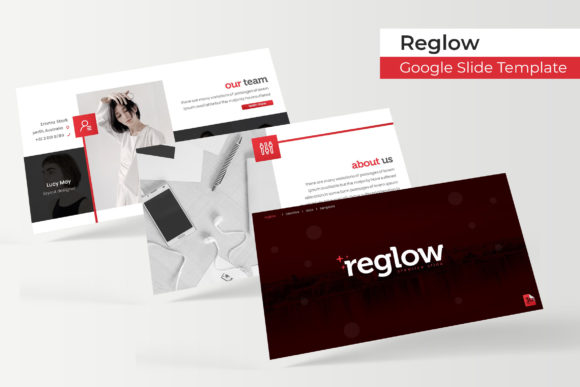
The Reglow Google Slide Template is not a single theme file; it is a complete slide ecosystem. With 150 total slides distributed across five premade color variations (30 slides per template), you have immediate access to a breadth of layouts. Instead of hunting for an appropriate slide design mid-presentation, you choose the color scheme that fits your brand or mood and start building right away. Each of the five color variations comes as a separate PPTX file, meaning you do not have to manually recolor slides or adjust palettes. The five PPTX files are provided in widescreen format, which aligns with modern screen standards and projection requirements.
This abundance of slides is not about having more for the sake of more. It speaks to a common user need: variety without inconsistency. Many presentation creators struggle with design drift—the first few slides look great, but as you add more content, the layout starts to feel repetitive or visually uneven. Reglow mitigates this by offering handcrafted infographic slides, section break slides, gallery and portfolio slides, and other specialized layouts. When you need to present data visually, you have infographics ready. When you want to mark a new chapter, a section break slide provides a clean transition. When you need to showcase images, the gallery and portfolio slides include picture placeholders with a drag-and-drop setup. You are not confined to a single template shape—you have a set of tools that match the natural flow of a compelling narrative.
For the Busy Professional: Rapid Assembly of Consistent Decks
Imagine you have an afternoon to prepare a client pitch. With Reglow, you open the color variation that best aligns with your company’s brand. You then drag and drop your content into the pre-built slides. The master slides ensure that headings, bullet points, and footers remain consistent across every page. You can resize and edit any graphic without breaking the design because the illustrations are pixel-perfect and scalable. Instead of worrying about layout details, you focus on your message. The outcome is a cohesive deck that looks intentional and well-produced.
For the Marketing Team: Visual Storytelling With Infographics and Portfolio Slides
Marketing presentations often require a blend of data and imagery. Reglow includes handcrafted infographic slides that help you present numbers and processes in a way that is easy to digest. Use a timeline infographic for your go-to-market strategy, or a circular infographic for your target audience breakdown. The gallery and portfolio slides come with image placeholders that you simply fill with your own screenshots, product photos, or case study visuals. This saves you from the tedious work of aligning images and wrapping text around them. The template handles the structure so you can tell your story with impact.
For Educators and Trainers: Clear Section Breaks and Structured Content
When teaching or training, organization is key to learner retention. Section break slides give you a moment to reset and announce a new topic. With Reglow, you can insert a visually distinct slide that separates modules or chapters. The consistent color coding across the five variations helps you color-code different units or topics. The editable graphics allow you to customize icons that represent your lessons. These small design choices reduce cognitive load for your audience and make your materials more accessible.
How to Get the Most Out of Reglow: Practical Recommendations
To truly leverage this template, think beyond simply filling in slides. Start by selecting the color variation that resonates with your audience. Reglow provides five premade colors, which means you have a library of moods at your disposal. A conservative corporate audience may respond best to the darker hues, while a creative presentation might call for a lighter, warmer palette. You can also mix variations across different presentations to keep your brand language fresh without redesigning every time.
Use the master slides to your advantage. Because Reglow is built on master slides, any changes you make to the slide master—such as updating fonts or adjusting a logo placement—apply to all slides instantly. This is a huge time-saver when you need to adapt a presentation for a different audience or update your company branding. The resizable and editable graphics mean you are not stuck with fixed elements. You can scale an illustration, change its color, or reposition it without losing resolution.
Drag-and-drop picture placeholders simplify image handling. If you frequently add screenshots or team photos, these placeholders maintain uniform sizing and alignment across your presentation. You avoid the common problem of images that are stretched or misaligned. Simply drop your chosen photo into the placeholder, and the template resizes it to fit perfectly.
The Readme file and included font download link are small but critical additions. Fonts are often overlooked, yet they heavily influence the professionalism of a slide deck. The template uses free fonts, and the link ensures you have exactly the typeface intended. Install the fonts before you begin editing so your text appears exactly as designed. This attention to typography elevates the entire deck.
Why This Template Meets the Needs of Different Users
Different creators approach presentation design with varying skill levels and priorities. A seasoned designer may appreciate the handcrafted infographics and pixel-perfect illustrations as a shortcut to high-quality slides without starting from scratch. A beginner, on the other hand, gains confidence from the structured layouts and clear guidance. The 30 slides per color variation give newcomers enough freedom to experiment while keeping them within a coherent system. Entrepreneurs often need to pivot their pitch decks quickly; having five separate PPTX files ready to go means you can switch colors between different investor meetings without redoing your work.
The built-in gallery and portfolio slides address a specific need for creatives, freelancers, and agencies. If you need to showcase your work, these slides present an organized, visually appealing way to display images without overcrowding the slide. The section break slides give you a natural pause between topics, which is particularly helpful in longer presentations where audiences need breathing room.
Reglow also acknowledges an often overlooked reality: the photographs or pictures used in the preview are not included. This is a fair and honest approach. You bring your own content, which means your presentation remains unique and authentic. The template provides the structure, not the stock images. This gives you full control over the visuals that represent your work or brand.
Key Considerations When Using Reglow Google Slide Template
Before you start, ensure that you are using a compatible version of PowerPoint or Google Slides. The template comes in PPTX format, which is widely supported. If you plan to use it in Google Slides, upload the file and the slides will convert cleanly. However, some advanced features like master slides may behave slightly differently in the online environment. Test a single slide first to confirm that your editing experience matches your expectations.
Think about the overall narrative arc of your presentation. Because Reglow offers 150 slides across five colors, it can be tempting to use too many slides. Instead, select only the layouts that serve your story. A pitch deck might use 15 slides from one color file. A lengthy training module might use 25 slides from a different color variation. The goal is to use the template to enhance your message, not to crowd it.
Finally, respect the color consistency. Each of the five premade colors is a fully coordinated palette. If you start mixing elements from different color files, you may lose the coherent look that makes the template effective. Stick to one variation per presentation. If you need a different color for a different context, create a separate file using the other PPTX.
Outcome: Presentations That Work Harder for You
The real value of the Reglow Google Slide Template lies not in the number of slides or the illustrations themselves, but in the peace of mind it provides. You no longer have to second-guess your design choices. You can delegate the layout work to a proven system and focus on the substance of your message. The result is a presentation that is polished, professional, and tailored to your audience. Whether you are closing a deal, teaching a class, or presenting a quarterly review, Reglow helps you deliver your ideas with clarity and confidence.