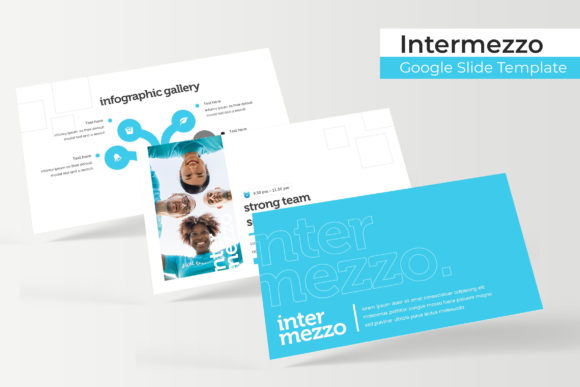
Intermezzo Google Slide Template
Building a presentation that holds attention, communicates clearly, and looks professionally designed is a challenge many people face. Whether you are preparing a client pitch, a classroom lecture, a portfolio showcase, or a business update, the visual foundation of your slides often determines how your message lands. The Intermezzo Google Slide Template offers a structured yet flexible solution for creating polished presentations without starting from a blank canvas. With 150 total slides across five distinct color variations, this template is built to serve a wide range of projects and skill levels.
At its core, the Intermezzo template provides a complete set of slide layouts, including handcrafted infographics, section break slides, gallery and portfolio pages, and resizable graphics. Each of the five premade color sets includes 30 slides, giving you a coherent visual system to work with from start to finish. Picture placeholders operate on a simple drag-and-drop basis, and every element is built on master slides for consistent editing. Pixel-perfect illustrations and editable graphics mean you can adapt the template to your own content without worrying about alignment or resolution issues.
This article explores what the Intermezzo Google Slide Template offers, how different audiences might approach it, and what factors matter most depending on your goals, experience level, and project type. The aim is to help you decide whether this template matches your needs and how to get the most value from it.
What the Intermezzo Template Offers
The template comes as five separate PPTX files, each in widescreen format and each containing a full set of 30 slides in a unique color scheme. This means you can choose the palette that fits your brand, topic, or personal taste, or switch between them for different projects. The included Readme file gives you the necessary font details, including a link to download the free font used, so your final presentation matches the designer’s intent.
The slide types cover a broad range of presentation needs. Section break slides allow you to transition between topics visually without losing momentum. Infographic slides help you present data, processes, and comparisons in a way that is easy to understand. Gallery and portfolio slides let you feature images, work samples, or team photos with a clean layout. Every graphic is resizable and editable, and the picture placeholders are designed for straightforward image replacement—just drag and drop your own photos into the frame.
One important detail to note is that the photographs shown in the preview are not included. They serve as examples only. You will need to supply your own images, which gives you full control over the final look and ensures originality in your presentation.
Beginners and Those New to Presentation Design
If you are relatively new to creating presentations or feel unsure about design principles, the Intermezzo template can save you a significant amount of time and effort. Because all slides are based on master slides, you can make global changes—like updating fonts or colors across the entire deck—without editing each slide individually. The drag-and-drop picture placeholders remove any guesswork about where images should go or how large they should be. You simply replace the placeholder image with your own, and the layout adjusts automatically.
For someone who needs to create a presentation quickly and wants it to look intentional and professional, this template reduces the learning curve. You do not need to know advanced Google Slides features to get good results. The handcrafted infographics are especially helpful here: they give you a way to present data or steps without having to build charts from scratch. As a beginner, you can focus on your message rather than worrying about alignment, color harmony, or visual hierarchy.
Professionals and Business Users
For professionals preparing client decks, internal reports, or conference presentations, consistency and polish are non-negotiable. The Intermezzo template delivers a unified look across all slides, which builds credibility and makes your content easier to follow. Having five color variations means you can match the template to your company branding or adapt it for different clients without starting over.
The section break slides are particularly useful in longer presentations where you need to signal a shift in topic. Whether you are presenting a quarterly review, a marketing strategy, or a product roadmap, these transitions help your audience stay oriented. The gallery and portfolio slides also work well for showcasing team members, case studies, or project outcomes. Because every element is editable, you can fine-tune the level of detail to suit your audience—adding more text for stakeholders who want depth, or keeping it visual for a high-level overview.
Speed matters in a professional setting. With 30 slides per color set, you have a full deck ready to populate. You do not need to design each slide from scratch, and you can reuse the template for multiple presentations over time. The pixel-perfect illustrations ensure that your slides look crisp on any screen, which is important whether you are presenting in a boardroom, on a video call, or at a conference.
Creators, Freelancers, and Portfolio Builders
If you are a designer, photographer, writer, or other creative professional, your presentation often serves as an extension of your portfolio. The Intermezzo template includes dedicated gallery and portfolio slide layouts that let you display your work cleanly. The resizable graphics and picture placeholders give you control over how each image is framed, and the five color variations allow you to pick a background that complements your work without overwhelming it.
For freelancers pitching to potential clients, the template helps you produce a polished proposal that reflects your professionalism. You can adapt the infographic slides to show your process, timeline, or results. Because the template is built on master slides, you can also customize it to include your logo, brand colors, and preferred fonts while maintaining a cohesive look. The free font download link included in the Readme file means you can use the same typeface across all your materials for consistency.
One practical advantage for creators is that you can prepare multiple versions of the same portfolio for different audiences. For example, you might use one color scheme for a corporate client and a different one for a creative agency. Having five complete sets in one purchase gives you that flexibility without extra cost or work.
Educators and Trainers
Educators often need to present complex information in a way that is accessible and engaging. The handcrafted infographics in the Intermezzo template are well suited for explaining processes, comparing concepts, or showing data in a visual format. The section break slides can help structure a lecture or training module into clear parts, making it easier for students to follow the flow of information.
For teachers, trainers, or workshop facilitators, the template also saves preparation time. Instead of building slides from week to week, you can work from a consistent visual system that your students become familiar with. Over time, this familiarity can help learners focus on content rather than adjusting to a new layout each session. The editable nature of all graphics means you can update your slides year after year, adding new examples or adjusting information as needed.
Ease of Use
For anyone who values a straightforward workflow, the Intermezzo template is designed to be accessible. The drag-and-drop picture placeholders, master slide structure, and prebuilt layouts mean you can start adding your content immediately. The Readme file provides clear instructions about fonts, so you avoid common issues like missing typefaces. Whether you are a beginner or a seasoned user, the template reduces friction in the creation process.
Cost and Value
Getting five complete color variations with 30 slides each means you are buying a system, not just a single deck. This can be particularly valuable for small business owners, freelancers, or educators who create multiple presentations throughout the year. You pay once and have a reusable foundation for many projects. The included infographics, portfolio slides, and section breaks add functionality that would take significant time to build from scratch.
Quality and Flexibility
Pixel-perfect illustrations and resizable graphics ensure that your slides maintain their quality whether viewed on a laptop, tablet, or projector. The flexibility comes from the editable nature of every element. You are not locked into a rigid structure. You can move, resize, recolor, or remove any component to suit your specific content. This makes the template suitable for both simple text-driven presentations and more visual, image-heavy decks.
Long-Term Usefulness
Because the template is based on Google Slides and provided in PPTX format, it remains usable regardless of software updates. You are not tied to a proprietary platform. The master slide approach also means you can update the entire presentation’s look with a few clicks if you decide to rebrand or change your visual direction later. This longevity matters for professionals and organizations that want their materials to stay consistent over time.
Does the Intermezzo Template Match Your Needs?
The answer depends on your specific situation. If you need a presentation quickly, want it to look cohesive and professional, and prefer not to spend hours on design details, this template is a strong candidate. The range of slide types—from infographics to portfolio pages to section breaks—covers most common presentation scenarios. The five color variations give you flexibility without requiring additional design work.
For those who already have strong design skills and a clear visual identity, the template still offers time savings. You can start from a prebuilt structure and customize every element to match your exact specifications. The editable graphics and master slide foundation mean you are not limited by the original design; you can adapt it as much or as little as you need.
If you are evaluating this template as a consumer or hobbyist, the cost-to-value ratio is favorable. You get a complete presentation system for a one-time purchase, and you can use it repeatedly for different projects. The learning investment is minimal, so you can focus on your content rather than the tool.
Ultimately, the Intermezzo Google Slide Template serves as a practical resource for anyone who wants to create better presentations with less effort. By understanding its features and matching them to your own priorities, you can decide whether it aligns with your goals, skill level, and project type. Whether you are pitching, teaching, showcasing, or reporting, having a reliable visual foundation lets you communicate with confidence.