Interior Design Furniture Instagram Posts That Actually Work for Your Brand
If you have ever spent an afternoon staring at a blank canvas in Photoshop, trying to create a single Instagram post for your furniture or interior design work, you already know how draining that process can be. You are not just designing a square image. You are trying to communicate a mood, a style, and a sense of trust with people who scroll past hundreds of posts every day. That is where a well-made Interior Design Furniture Instagram Post template can change everything.
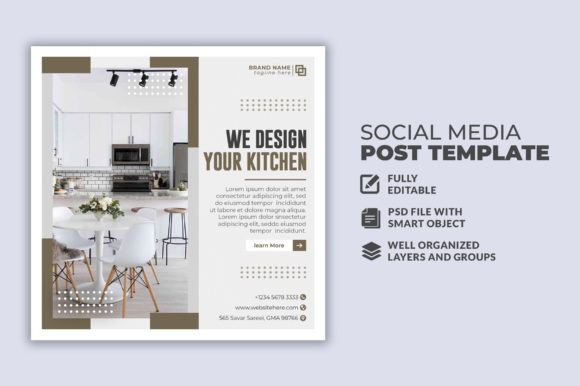
These templates are pre-built PSD files, typically 1080 by 1080 pixels, that give you a complete visual structure for your social media content. You get layers, editable text, and a layout that already works. You do not need to start from scratch. You do not need to guess what looks good. You just open the file, swap in your own image, adjust the text, and you have a post that looks like it took hours to create.
Where People Actually Use These Templates
Most people assume these templates are only for furniture brands posting product shots. That is one use, but it is far from the only one. Interior designers use them to showcase before-and-after transformations. Home staging professionals use them to highlight key pieces in a room. Even real estate agents use furniture-focused templates to present staged homes in a way that feels curated and intentional.
You also see these templates being used on platforms beyond Instagram. Many creators repurpose the same square layout for Pinterest pins, Facebook ads, and even blog featured images. The format is standard enough that one design can serve multiple channels without feeling out of place.
When These Templates Become Most Valuable
Timing matters. If you are launching a new collection of furniture, you need multiple posts in a short window. A single template can give you a consistent look across five, ten, or twenty posts without each one requiring a full design session. The same applies during seasonal promotions. Black Friday, summer sales, or holiday home tours all demand fast turnaround. Templates let you keep the visual quality high while you focus on the offer itself.
Another moment where these templates prove their worth is when you are building a portfolio for a client. If you are a designer pitching to a new client, you often need to show how you would present their space on social media. A polished template makes that pitch look real and professional.
Why Different Users Reach for These Templates
Small business owners running furniture boutiques often wear every hat. They source products, manage inventory, handle customer inquiries, and still need to post on social media three times a week. For them, a template is not a shortcut. It is a survival tool. It reduces the time spent on design from an hour to ten minutes, and it ensures the brand stays consistent even when they are exhausted.
Interior design bloggers and educators use these templates to separate their content from the noise. When you are teaching people how to choose a sofa or how to arrange a living room, the visual presentation of your post needs to reflect the same care you are teaching. A cluttered or poorly designed post undermines your credibility. A clean, layered template does the opposite.
Freelancers and creative entrepreneurs often work with multiple clients across different aesthetics. Instead of building a new design system for every client, they keep a library of templates and adapt them. The 100 layered structure makes this possible. You can change colors, move elements, swap fonts, and make each template feel custom without rebuilding the file.
Practical Scenarios That Feel Real
Imagine you are a home stager preparing to list a mid-century modern house. You have photos of the living room with a new walnut credenza and a leather lounge chair. You want to post it on Instagram with a short description about the piece and how it works in the space. Instead of opening a blank document, you pull up a template that already has a subtle grid, a text area with a clean sans-serif font, and a color overlay that matches warm wood tones. You drop in your photo, type your caption, and post. That is the reality of how most professionals use these files.
Now imagine you are a furniture reseller who sources vintage pieces and restores them. Your Instagram feed is your storefront. You need each post to show the item clearly, but you also want to build a consistent visual identity that makes people recognize your brand instantly. A template with a consistent layout, logo placement, and typography does exactly that. Over time, your audience starts to recognize your posts before they even read the caption.
What to Consider Before You Choose a Template
Not every template will work for every situation. Before you buy or download an Interior Design Furniture Instagram Post template, think about the actual images you plan to use. Some templates are built for single product shots with lots of negative space. Others are better for room scenes with multiple elements. If your photos are wide-angle shots of a full living room, you need a template that can accommodate that composition without cropping out important details.
Also consider the text load. Some templates leave very little room for copy. If you like writing detailed captions directly on the image, you want a template with a dedicated text block that does not feel cramped. On the other hand, if you prefer minimal text and let the photo speak, a template with a small headline area might be perfect.
Typography matters more than most people realize. The best templates use free fonts or widely available typefaces. That way, when you open the file on your computer, the text renders correctly without missing font errors. The product description you mentioned says free font use, which is a practical advantage. It means you do not have to hunt down expensive typefaces just to make the template work.
Connecting Features to Real Outcomes
When a template is described as 100 layered and fully editable, that is not just a technical spec. It means you can remove elements you do not need. You can change the background color to match your brand palette. You can move the furniture image to a different position if the original layout does not fit your photo. You can even delete the placeholder image layer entirely and drop in your own without fighting with masks or locked groups.
The 1080 by 1080 pixel size is standard for Instagram square posts, but it also works for other platforms. That consistency saves you from having to resize or reformat for every channel. One design, multiple uses.
The fact that all text is editable with the text tool means you are not stuck with someone else's copy. You can write your own headlines, add your own call-to-action, and include your own brand voice. For a furniture designer who values storytelling, that is essential. You are not just posting a picture of a chair. You are telling people why that chair belongs in their home.
How Different Users Benefit in Different Situations
A marketer working for a furniture brand uses these templates to maintain visual consistency across a team. When multiple people are posting, a shared template library ensures every post looks like it came from the same brand. No one accidentally uses the wrong font or stretches an image awkwardly.
A hobbyist who loves interior design but does not have formal graphic design training uses templates to create posts that look professional. They do not need to learn color theory or layout principles. The template handles that. They just need to add their photo and their message.
An educator teaching an online course about interior styling uses templates for course materials and social media promotion. When students see a polished post, they are more likely to trust the instructor and sign up for the full course. The template becomes part of the credibility package.
A publisher running a home decor blog uses templates to create consistent featured images for articles. Instead of designing a new graphic for every post, they use a template and swap the photo and headline. That consistency builds a recognizable brand on social media and drives more clicks to the blog.
What to Look For in a Quality Template
Organization matters. A well-organized PSD file has clearly named layers and folders. You should be able to find the image layer, the text layer, and the background layer without digging through dozens of unnamed groups. The product description mentions well organized easy to edit, which is exactly what saves you time. When you are in a hurry, you do not want to guess which layer controls the shadow or the border.
Also check whether the template includes smart object layers for images. Smart objects let you double-click, insert your photo, and save. The template updates automatically. That workflow is much faster than manually placing and resizing images each time.
Be aware that images are not included in most template packs. That is normal. You supply your own furniture photos. The template provides the structure around them. If you are looking for a complete solution, you might also want to invest in good product photography or use high-quality stock images that match your style.
Making the Template Work for You
Start by opening the PSD and exploring the layers. See what is locked and what is editable. Change the placeholder text to your own copy. Drop in one of your best furniture images. Adjust the colors if needed. Then save and export as a JPEG or PNG for Instagram.
Do not be afraid to experiment. Because the file is fully layered, you can duplicate the template and try different layouts. Keep one version with a dark background and another with a light background. Use the dark version for moody, dramatic pieces and the light version for airy, minimalist designs.
Over time, you might find that certain templates become your go-to for specific types of posts. One template might work best for product launches. Another might be better for educational content or style guides. Building a small library of a few reliable templates gives you flexibility without overwhelming your workflow.
The real value of an Interior Design Furniture Instagram Post template is not in the design itself. It is in the time and mental energy it saves you. Instead of wrestling with layout decisions every time you need a post, you focus on what actually matters: your furniture, your clients, your story, and your business. The template handles the rest.