Elevating Presentations with the Kinara Google Slide Template
Creating a presentation that resonates with an audience requires more than just good data. It demands visual coherence, narrative flow, and a design language that supports the message rather than distracting from it. For professionals, educators, and creative teams who rely on Google Slides, finding a template that balances flexibility with polished aesthetics can be a challenge. The Kinara Google Slide Template addresses this need by offering a comprehensive suite of design assets that simplify the creation process while delivering professional-grade results. Instead of starting from a blank canvas or struggling with mismatched slides, users gain access to a thoughtfully constructed system that anticipates common presentation needs.
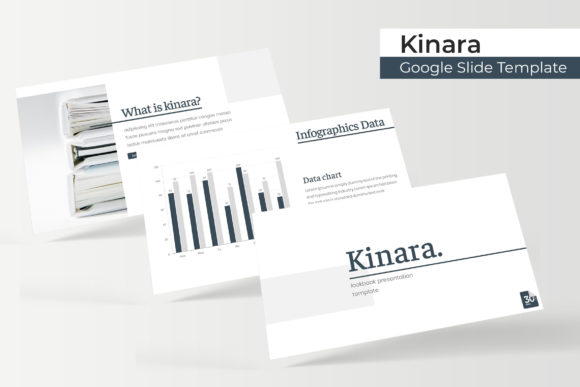
What makes the Kinara template stand out in a crowded market is its sheer scale and attention to detail. With 150 total slides organized into 5 premade color variations, each containing 30 slides per template, users are not limited to a single look. This variety allows presenters to maintain brand consistency while adapting the tone for different audiences. Whether presenting a quarterly report to executives or pitching a creative concept to clients, having multiple color schemes at hand eliminates the need to rebuild slides from scratch. The structure of the template also ensures that every slide type—from title layouts to data-driven infographics—follows a cohesive visual hierarchy, which helps audiences follow along without cognitive friction.
Design Versatility Across Five Color Variations
One of the most practical features of the Kinara Google Slide Template is its approach to color customization. Rather than offering a single palette that may not suit every brand, the template provides 5 premade color variations, each applied across 30 slides. This means users can choose a warm, professional tone for corporate settings, a cooler palette for technology presentations, or a vibrant scheme for creative industries. The colors are not arbitrary—they are balanced to ensure readability, contrast, and emotional appropriateness for different contexts.
For users who need to align slides with existing brand guidelines, the template's reliance on master slides makes global changes straightforward. Updating a color across all 30 slides takes seconds, preserving consistency without manual adjustments. This is particularly valuable for teams that reuse templates across departments or for recurring presentations. Instead of each team member interpreting brand colors differently, the template enforces uniformity while allowing individual slides to remain editable. The result is a presentation that feels custom-built, even when constructed from pre-designed assets.
Handcrafted Infographics for Data Storytelling
Data-heavy presentations often suffer from cluttered slides that overwhelm rather than inform. The Kinara template addresses this with handcrafted infographics designed specifically for Google Slides. These infographics are not generic charts imported from external tools. They are built within the slide environment, using shapes, icons, and typography that match the template's overall design language. This integration means that resizing, recoloring, or repositioning elements does not break the visual flow.
Common data presentation challenges—such as comparing metrics, showing progression over time, or illustrating proportions—are handled through dedicated infographic layouts. For example, a slide comparing quarterly revenue growth uses visual cues like gradient fills and iconography to guide the eye naturally from one data point to the next. This reduces the cognitive load on the audience, allowing them to grasp insights quickly. The template also includes section break slides, which serve as visual pauses between major topics. These slides give the audience a moment to process information before moving to the next section, improving retention and engagement during longer presentations.
Gallery and Portfolio Slides for Visual Content
Not every presentation relies on text and charts. Creative professionals, photographers, designers, and marketers often need to showcase visual work in a way that highlights quality without distraction. The Kinara Google Slide Template includes dedicated gallery and portfolio slide layouts that arrange images in clean, grid-based compositions. These layouts use consistent spacing, subtle borders, and alignment that draws attention to the visuals themselves rather than the slide structure.
The gallery slides are built with picture placeholders that support drag-and-drop functionality. Instead of manually cropping or resizing images to fit a frame, users can simply drop their pictures into the designated areas, and the template automatically adjusts the composition. This saves significant time when preparing portfolios, case studies, or project recaps. For agencies pitching to clients, these gallery slides convey professionalism and attention to detail, reinforcing the quality of the work being presented. The portfolio layouts are equally useful for internal reviews, where team members need to evaluate creative assets in a structured format.
Resizable and Editable Graphics Throughout
A common frustration with presentation templates is the inability to customize graphics without breaking their alignment or proportions. The Kinara template overcomes this by ensuring that all graphics are resizable and editable. Whether adjusting an icon, extending a timeline bar, or modifying a diagram, users can scale elements without losing sharpness or distorting shapes. This is possible because the template relies on vector-based illustrations and carefully constructed shapes rather than embedded raster images.
For users who are not design experts, this feature removes the intimidation factor. You do not need to know advanced graphic design techniques to make slides look cohesive. The template's graphics are built to be intuitive: clicking on an element reveals handles for resizing, and color fills can be updated from the toolbar. This flexibility is especially useful when repurposing slides for different audiences. A slide originally designed for a technical audience can be adapted for a general audience by simplifying diagrams or changing color accents, all within the same template framework.
Pixel-Perfect Illustrations and Master Slide Architecture
Visual consistency across a presentation often comes down to the quality of the underlying illustrations. The Kinara template features pixel-perfect illustrations that maintain crisp edges and precise alignment at any size. This level of detail matters when presentations are projected on large screens or viewed on high-resolution displays. Blurry or misaligned graphics can undermine credibility, whereas sharp, well-proportioned visuals reinforce the professionalism of the content.
The template's use of master slides further enhances consistency. Master slides act as blueprints for all other slides in the deck. By editing a master slide, changes propagate automatically to every slide that uses that layout. This is particularly useful for applying global changes such as updating footer text, repositioning logos, or adjusting background elements. Teams working collaboratively benefit from this architecture because it minimizes the risk of inconsistencies creeping in when multiple people edit the same file. The master slide approach also speeds up the initial setup process, allowing users to focus on content rather than layout tweaks.
What’s Included in the Package
When purchasing the Kinara Google Slide Template, users receive a package designed for immediate use. The download includes 5 PPTX files, each corresponding to one of the 5 premade color variations. All files are formatted in widescreen (16:9), which is the standard for modern displays and projectors. Additionally, a Readme First document provides guidance on installation, font usage, and customization tips. The package also includes a free font download link to ensure that the typography renders correctly, regardless of the system used to edit the presentation.
It is important to note that the photographs and pictures shown in the preview are for illustration purposes only and are not included in the download. This is standard practice for design templates, as using stock photography would increase licensing costs and limit customization. Users are encouraged to replace placeholder images with their own visuals or licensed stock photos. The template's picture placeholders are designed specifically to accommodate this replacement process, making it seamless even for those with minimal design experience.
Practical Applications in Modern Workflows
The Kinara Google Slide Template fits naturally into modern presentation workflows, especially for teams that collaborate remotely or across time zones. Since Google Slides is cloud-based, multiple team members can edit the same file simultaneously, and the template's structure supports this collaborative approach. The use of master slides and consistent color schemes reduces the back-and-forth typically associated with aligning slide designs. For project managers preparing weekly status updates, the template offers predefined layouts for timelines, milestones, and team rosters. For marketing professionals, the portfolio and gallery slides enable quick assembly of campaign recaps or creative briefs.
Educators and trainers also benefit from the template's variety. Lecture materials that require both explanatory slides and visual examples can be organized using section breaks and infographics. Students are more likely to stay engaged when slides alternate between data, visuals, and text in a deliberate rhythm. The Kinara template supports this pacing by providing distinct slide types that prevent monotony. Instead of a single layout repeated 30 times, the presentation feels dynamic and thoughtfully structured.
Considerations Before Choosing a Template
Before committing to a presentation template, users should evaluate how well it aligns with their typical content types. The Kinara template is best suited for professionals who need to present a mix of data, text, and visuals in a polished format. Its strength lies in its variety and precision, making it a solid choice for corporate presentations, client pitches, academic lectures, and creative showcases. However, users who require highly specialized layouts—such as complex financial models or interactive elements—may need to supplement the template with custom slides.
Another consideration is the learning curve associated with master slides. While the template is designed to be intuitive, users unfamiliar with Google Slides' master view may need a few minutes to understand how to apply global changes. The included Readme First document addresses this, but it is worth noting that the initial setup requires a brief investment of time. Once understood, the efficiency gains are substantial, particularly for users who create presentations frequently.
Observations on Design and Usability
From a design perspective, the Kinara Google Slide Template strikes a balance between contemporary aesthetics and professional restraint. The color palettes are not overly saturated, and the typography choices prioritize readability. The handcrafted infographics avoid the trap of looking overly complex, which is a common issue with data visualization in presentations. Instead, each infographic communicates one main idea, reducing the risk of information overload.
Usability is further enhanced by the drag-and-drop picture placeholders and resizable graphics. These features lower the barrier for users who may not have advanced design skills, enabling them to produce presentations that look as though they were created by a professional designer. The inclusion of section break slides also adds a layer of narrative structure that is often missing in DIY presentations. These breaks give the audience a moment to reset, which is especially valuable during longer sessions where attention spans wane.
Ultimately, the Kinara template offers a practical solution for anyone who wants to elevate their Google Slides presentations without investing hours in design work. Its combination of volume, variety, and precision makes it a tool that adapts to the user's needs rather than forcing the user to adapt to the template. For teams and individuals alike, it provides a foundation that supports clarity, consistency, and creative flexibility.