RE-ARRANGE PowerPoint Template: Build Presentations That Actually Work
You know the drill. You need a presentation for a client pitch, an internal report, or a product launch. You open PowerPoint, stare at the default templates, and feel that familiar frustration. The layouts feel stiff. The colors look dated. And you end up spending hours tweaking things that shouldn't take more than a few minutes.
That is exactly what the RE-ARRANGE PowerPoint template aims to fix. It is not just another slide deck with a handful of mediocre layouts. This is a complete presentation system designed to help you move fast, look professional, and adapt your slides to different branding needs without starting from scratch each time.
What Exactly Is RE-ARRANGE?
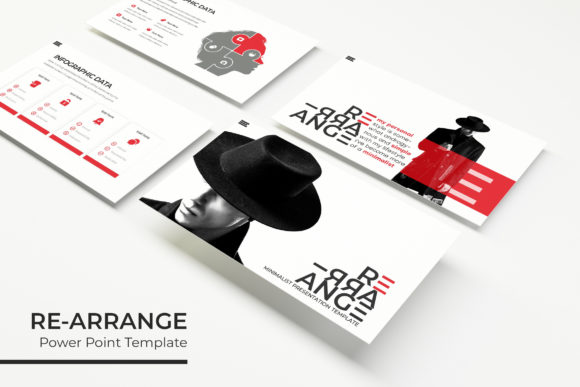
At its core, RE-ARRANGE is a modular PowerPoint template built around flexibility. It includes 150 total slides organized across 5 premade color variations, meaning you get 30 slides per template. That is thirty unique layouts for each color scheme, covering everything from cover slides and section breaks to data visualization and portfolio pages.
The visual personality here is clean, modern, and purpose-driven. This is not a template that screams for attention with loud gradients or trendy effects. Instead, it relies on pixel-perfect illustrations, thoughtful spacing, and a restrained use of color to let your content breathe. The handcrafted infographics and resizable graphics give you the ability to explain complex ideas visually without needing to be a designer yourself.
Everything is built on master slides, which means you make one change and it ripples through the entire deck. That consistency is the difference between a presentation that looks assembled and one that feels intentional.
Who Benefits Most from This Template Set
If you fall into any of the following categories, RE-ARRANGE will likely save you time and frustration:
- Designers and creative professionals who need presentation decks that mirror their visual standards
- Entrepreneurs and small business owners pitching to investors, clients, or partners
- Marketers and brand strategists building decks for campaigns, strategy sessions, or internal alignment
- Content creators and bloggers who repurpose presentation slides for social media, YouTube thumbnails, or lead magnets
- Publishers and editors preparing book proposals, editorial pitches, or portfolio reviews
- Hobbyists and crafters who want professional-looking slides for workshops, classes, or community events
The versatility comes from the five color variations. You are not locked into one brand identity. If you work with multiple clients or run different projects, you can switch templates easily and maintain a cohesive look across each deck. The drag-and-drop picture placeholders mean you simply insert your images without worrying about alignment or cropping issues.
How RE-ARRANGE Affects Readability and Visual Hierarchy
Presentations live or die on clarity. A cluttered slide with mismatched fonts and inconsistent spacing will lose your audience before you say a word. The RE-ARRANGE template handles the heavy lifting on visual hierarchy so you can focus on your message.
The gallery and portfolio slides are particularly well thought out. They give you multiple layout options for showcasing work, products, or case studies. You maintain a consistent grid structure across slides, which trains the audience's eye to know where to look. That predictability builds trust and keeps attention where it belongs.
Because everything is built on resizable and editable graphics, you can scale elements up or down without breaking the layout. The infographics are handcrafted, which means they communicate data in a way that feels human rather than robotic. Charts, timelines, and process flows become digestible at a glance.
The color variations themselves support readability. Each of the 5 premade colors is chosen to balance contrast and tone. Dark backgrounds with light text for impact slides. Light backgrounds with dark text for content-heavy slides. You do not have to guess which combinations work because they have already been tested across the full deck.
Evaluate Your Project Fit Before You Start
Before diving into the template, ask yourself: What kind of presentation am I building? Is it a data-heavy quarterly report, a creative portfolio, or a persuasive sales deck? RE-ARRANGE works especially well for narrative-driven presentations where you need both visual impact and information density. If you are building something that requires lots of text-heavy slides, the section break slides and infographic layouts will help you break up content and maintain momentum.
Test the Color Variations Against Your Brand
Open each of the 5 PPTX files and drop in a few of your actual images. See how the colors interact with your photography, logos, and illustrations. Some color schemes will feel natural right away. Others might need minor tweaks. Because the template is built on master slides, you can adjust the palette globally and see results in seconds. This is where the flexibility pays off.
Pair the Template Thoughtfully with Fonts
The template comes with a note about fonts and includes a download link for free font resources. The visual style of RE-ARRANGE pairs best with clean, legible typefaces like sans serif fonts for body text and headings. If you want contrast, consider a serif font for headlines and a neutral sans for copy. Avoid using script fonts or handwritten fonts for body text in presentations, as they reduce readability at a distance. Save display or decorative fonts for title slides and section breaks only.
Review the Included Styles and Layouts
You get 30 slides per template, and not every layout will fit your project. That is okay. Go through the deck and mark the slides you know you will use: cover, portfolio, section break, infographic. Build your presentation around those core layouts and leave the rest for future projects. Over time, you will develop a mental map of what each color variation offers and when to reach for it.
Consider Commercial Licensing Needs
The template itself is ready for commercial use. The design assets you create from it belong to you. However, the photographs or pictures used in the preview are for illustration purposes only and are not included. You will need your own images or licensed stock photography. The template comes with 5 PPTX files in widescreen format, so you are ready to present on modern monitors and projectors without black bars or awkward cropping.
Where RE-ARRANGE Works Best Across Different Projects
The strength of this template is its adaptability across contexts. Here are a few realistic scenarios where it shines:
- Logo design and brand identity decks: Present your process, mood boards, and final concepts in a clean, professional package that reinforces your design thinking.
- Editorial design and publishing proposals: Showcase layouts, spreads, and cover concepts with the portfolio slides. The grid structure mirrors what editors expect to see.
- Web design and UX case studies: Walk through user journeys, wireframes, and final designs using the infographic and section break slides to separate phases.
- Social media graphics and content marketing: Repurpose your slides as individual graphics for Instagram, LinkedIn, or blog features. The consistent visual system makes your content instantly recognizable.
- Packaging design presentations: Display product renders, mockups, and variations across multiple slides without overwhelming the viewer.
The 5 premade color themes also make it possible to create presentations for different clients or departments without reinventing the wheel. Keep a master file for each color variation and pull from them as needed. Over time, you build a library of presentation assets that feel cohesive but not identical.
Why This Approach Matters for Brand Perception
When you present with a template that handles spacing, alignment, and visual hierarchy well, you communicate competence before you say a word. The audience registers the polish. They trust the content more because the container feels intentional. Modern typography and consistent design choices signal that you pay attention to details—which is exactly what you want clients, investors, or stakeholders to think about your work.
Conversely, a messy presentation undermines even the best ideas. Awkward image placement, mismatched colors, and unbalanced slides create friction. The RE-ARRANGE template removes that friction so your ideas stand on their own.
The Bottom Line on RE-ARRANGE
This is a practical, well-structured tool for anyone who needs to produce professional presentations regularly. The 150-slide count across 5 color variations gives you enough material to cover most scenarios. The master slides and drag-drop placeholders save hours of manual formatting. The handcrafted infographics and gallery layouts handle the design heavy lifting so you can focus on content.
If you have been limping along with default templates or spending too much time fighting PowerPoint, RE-ARRANGE is worth a serious look. It does not promise to make you a designer overnight. It simply gives you a solid foundation to build presentations that work—for your audience and for your brand.