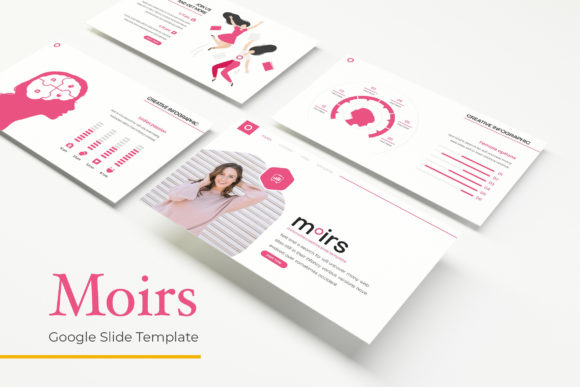
Moirs Google Slide Template: Creative Powerhouse
Finding a presentation tool that balances structure with creative freedom can feel like a search for a rare artifact. You need slides that look polished, but you also want room to make them your own. Moirs Google Slide Template offers exactly that balance—a system built on 150 total slides, five distinct color variations, and handcrafted infographics that feel intentional rather than generic. Whether you are pitching a business idea, building a portfolio, or teaching a course, this template gives you a solid foundation without boxing you in.
What Makes Moirs Google Slide Template Stand Out
At first glance, Moirs appears to be a well-organized collection of slides. But dig a little deeper, and you will notice it is designed around modular thinking. Every element—from the section break slides to the gallery and portfolio layouts—is built on master slides. That means when you drag and drop an image into a picture placeholder, the proportions and alignment stay consistent across the entire deck. No more fiddling with cropping or resizing each photo individually.
The template includes 30 slides per color scheme, which means each of the five premade colors gives you a complete toolkit. You are not limited to a single look. If you start with a navy palette for a corporate proposal but later want something warmer for a creative pitch, you can switch to the complementary color variation without rebuilding your content. This kind of flexibility saves hours of rework.
Five Colors, Endless Possibilities
Color can make or break a presentation. The wrong palette can distract, while the right one reinforces your message without saying a word. Moirs offers five color variations, each carefully curated to work across different contexts. One might lean cool and professional, another bright and energetic. Having these options means you can match your brand or mood without starting from scratch.
For a freelancer pitching to a tech startup, a clean monochrome scheme with subtle accent colors can convey precision and modernity. For an educator presenting a workshop on creative thinking, a warmer palette with playful highlights might better engage the room. The beauty of having five built-in options is that you can experiment. Try a color variation you would not normally choose—it might unlock a visual direction you had not considered.
Handcrafted Infographics That Communicate Clearly
Infographics are one of the most effective ways to simplify complex ideas. Moirs includes handcrafted infographic slides designed in PowerPoint, which means they are fully editable. You can adjust data points, swap icons, or change the layout to fit your narrative. These are not static images—they are building blocks you can reshape.
Imagine you are a small business owner presenting quarterly results. Instead of a dense spreadsheet, you can use a handcrafted timeline or comparison chart from the template. The visual hierarchy is already there: headers, supporting text, and graphic elements work together to guide the viewer’s eye. You only need to replace placeholder text and data with your own. The result is a slide that looks professionally designed but took you minutes to complete.
How Designers and Marketers Can Use It
Designers often need to present mood boards, case studies, or portfolio pieces. The gallery and portfolio slide layouts in Moirs are built for exactly this. Picture placeholders let you drop in your best work, and the grid-based layout ensures everything stays aligned. You can even use the section break slides to divide your portfolio into categories—web design, branding, illustration—so the viewer follows a clear visual journey.
Marketers, on the other hand, might use the template for campaign proposals or client reports. The resizable and editable graphics mean you can adapt charts and diagrams to show campaign performance, audience growth, or conversion metrics. Because the template is based on master slides, fonts and colors remain consistent throughout. Your brand stays intact, even when you are presenting data-heavy content.
For both groups, the drag-and-drop picture placeholders are a time saver. You do not need to align images manually or worry about pixelation. Every element is pixel-perfect out of the box. This attention to detail matters when your audience is evaluating your professionalism.
Adapting Moirs for Blogs, Portfolios, and Education
The template is not limited to business presentations. Bloggers can repurpose the slides to create visual summaries of their posts or to outline a content calendar. The section break slides work well as chapter dividers in longer-form content, such as an email course or a digital guide. You can export slides as PDFs or images to share on social media or your website.
Entrepreneurs launching a new product can use the gallery slides to showcase features, while the portfolio layouts help tell the story behind the product development. Educators can create interactive lessons by building on the handcrafted infographics and adding their own data. The five color variations also make it easy to differentiate modules or topics within a single course.
Hobbyists and creatives will appreciate the flexibility to experiment without feeling constrained. You can mix and match slides from different color schemes, change accent colors, or swap out icons. The template gives you a starting point, but you are free to adapt it to your style.
Practical Tips for Keeping Your Presentation Clear and Consistent
Even with a well-designed template, clarity comes from how you use it. Start by choosing one color variation and stick with it throughout your deck. If you need to switch, do so at a section break so the change feels intentional rather than random. Use the handcrafted infographics sparingly—one per major idea is usually enough. Overloading a slide with charts or diagrams can confuse your audience instead of clarifying your point.
Take advantage of the master slides for headings and body text. Consistency in typography and spacing makes your presentation feel cohesive. When you insert images via picture placeholders, choose high-quality visuals that complement your content. The template will handle the positioning, but the emotional impact of your images is still up to you.
If you plan to share your slides with collaborators, the included PPTX files for both standard and widescreen formats make it easy. You can work offline, send files via email, or upload them to Google Drive. The readme file includes a link to the free fonts used in the template, so your team can install them and maintain consistency.
Why Pixel-Perfect Illustrations Matter
Small details can elevate a presentation from good to memorable. Moirs includes pixel-perfect illustrations that scale cleanly whether you project them on a large screen or display them on a tablet. These illustrations are not just decoration—they support your message by adding visual context without cluttering the slide.
When you combine these illustrations with the resizable graphics, you have a visual language that feels custom-made. You are not forced to rely on stock imagery that might not fit your topic. Instead, you can adapt the included assets to reinforce your narrative. This level of polish signals to your audience that you have invested time in your presentation, even when you built it quickly.
Getting the Most from Moirs
To fully leverage the template, explore all five color variations before you decide on your final palette. Open each PPTX file and browse the 30 slides. Notice how the same layout looks different in each color scheme. This exploration can inspire new ways to organize your content. Maybe the warm palette works better for your personal brand, while the cool one suits a client project.
Use the section break slides to give your audience mental pauses. A well-placed break slide after a dense data section lets the room reset before you dive into the next topic. The gallery and portfolio slides are ideal for visual-heavy segments, but they can also serve as a way to highlight key achievements or testimonials.
Finally, remember that the photographs shown in the preview are for illustration only. The template provides placeholders, so you will need your own images. This is actually an advantage—you can use photos that are authentic to your work or brand. Whether you shoot your own or use a stock library, the template’s layout will make them look intentional and professional.
Moirs Google Slide Template gives you a structure that supports creativity rather than limiting it. With 150 slides, five color variations, and editable graphics at your fingertips, you have everything you need to build presentations that are clear, consistent, and uniquely yours. Start with the template, but make it your own—that is where the real impact happens.