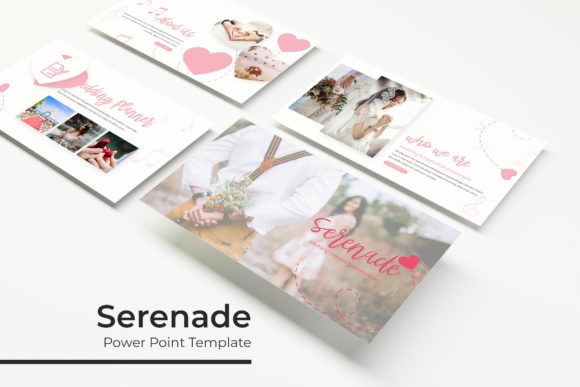
Serenade Power Point Template
If you have ever built a presentation from scratch, you know how quickly things can go sideways. Aligning text boxes, resizing images, matching colors across slides, and trying to keep everything visually consistent often eats up hours you do not have. The Serenade Power Point Template is designed to remove that friction entirely. It gives you a polished, flexible foundation so you can focus on your message rather than wrestling with formatting. With 150 total slides spread across five carefully crafted color variations, this template feels less like a generic deck and more like a bespoke design system built for real-world use.
What the Serenade Power Point Template Brings to Your Workflow
At its core, this template is about saving time without sacrificing quality. Each of the five premade color themes includes 30 slides, giving you a complete presentation framework right out of the box. Whether you are pitching to a client, presenting quarterly results, or building a portfolio to attract new business, the structure is already there. You simply drop in your content and adjust as needed.
The visual personality of the Serenade Power Point Template leans modern, clean, and approachable. It avoids overly decorative elements that can distract from your message, while still offering enough character to make your slides feel intentional. The handcrafted infographics are a standout feature. Rather than relying on generic charts, you get custom-built visuals that communicate data clearly and look like they were produced by a dedicated design team. Section break slides give your audience a moment to reset between topics, and the gallery and portfolio slides are especially useful if you need to showcase work samples, product images, or client case studies.
Pixel-perfect illustrations and resizable, editable graphics mean you are never stuck with a static design that does not quite fit your brand. Everything scales cleanly, and because the template is built on master slides, changes you make to one master update across all related slides automatically. That kind of consistency is hard to overstate when you are managing a long deck.
Where This Template Works Best Across Projects
The Serenade Power Point Template is versatile enough to handle a wide range of use cases, but it really shines in a few specific areas. For brand identity presentations, the clean layout and premade color themes help you present logo variations, typography samples, and brand guidelines without the slides themselves competing for attention. If you are a designer or creative professional, the portfolio and gallery slides let you display your work in a way that feels curated rather than cluttered.
Marketers and entrepreneurs will find the infographics and data slides particularly useful. Whether you are walking stakeholders through campaign performance or pitching a new product idea, the ability to communicate numbers visually without relying on clunky default charts makes a noticeable difference in how your information is received. The section break slides also give you natural pauses, which is helpful when you are presenting complex information and want to let each point land before moving on.
For bloggers, publishers, and content creators, the template works well for media kits, sponsorship decks, and content strategy presentations. The picture placeholders with drag-and-drop functionality make it easy to swap images without resizing or cropping manually. If you produce a lot of visual content, this alone can save you hours per deck.
Small business owners and hobbyists who may not have dedicated design support also benefit from the structure. The template does not assume you have advanced PowerPoint skills. You can customize colors, replace images, and edit text without needing to learn complex tools. The included Readme file and free font download link make setup straightforward, so you spend less time troubleshooting and more time building your presentation.
How Design Consistency Elevates Your Message
Consistency in a presentation signals professionalism. When every slide follows the same visual logic, your audience can focus on your content instead of being distracted by mismatched styles. The Serenade Power Point Template reinforces this through its master slide architecture. Any change you make to the master layout – whether adjusting font sizes, repositioning placeholders, or updating color accents – applies uniformly across the deck. This is especially valuable when working in teams, where multiple people may be editing the same file.
The five color variations also help you align the template with your existing brand identity. Whether your brand leans warm and neutral, cool and professional, or bold and energetic, there is a palette that will fit without requiring extensive manual adjustments. Having five options means you are not stuck forcing your content into a single aesthetic. You can choose the variation that best represents your message and audience.
Visual hierarchy improves naturally with this template because the slide layouts are designed with clear focal points. Titles, body text, and supporting visuals each have designated zones. This prevents the common problem of overcrowding where every element competes for attention. When your slides have clear visual hierarchy, your audience absorbs information more easily, and your call to action or key takeaway stands out as intended.
Brand perception is influenced by every touchpoint your audience sees. A well-designed presentation suggests that you pay attention to details, respect your audience’s time, and understand the value of clear communication. The Serenade Power Point Template helps you project that impression without requiring you to be a professional designer. The pixel-perfect illustrations and resizable graphics maintain their quality across different screen sizes and projection formats, so your presentation looks polished whether viewed on a laptop, monitor, or large conference screen.
Practical Guidance for Choosing and Using This Template
When evaluating whether the Serenade Power Point Template fits your project, start by considering the tone you want to set. The five color themes each carry a different energy. Lighter, muted palettes work well for professional services, consulting, and education, where clarity and calmness are priorities. Bolder color choices are better suited for creative agencies, product launches, or presentations where you want to generate excitement. Think about your audience’s expectations and select the variation that aligns with their likely preferences.
Testing font pairings is also worth your time. The template uses a clean, readable typeface that works well for both headings and body text, but you can easily swap in your own fonts if your brand guidelines require it. The Readme file includes links to free fonts used in the design, so you can replicate the exact look shown in the preview slides. If you choose to substitute fonts, stick with combinations that maintain strong contrast between headings and body copy. A bold display font for titles paired with a clean sans serif for body text usually works well for presentations intended for professional or commercial audiences.
Review the included slide types before you start building. With 30 slides per template, you get a variety of layouts including title slides, content slides, section breaks, infographic pages, portfolio layouts, and closing slides. Familiarizing yourself with the full range helps you plan your content structure in advance. You will avoid the frustration of realizing mid-edit that you need a layout that does not exist. Everything you need for a complete narrative arc is already there.
Readability is another factor worth considering. The template uses well-proportioned margins, adequate line spacing, and clear contrast between text and background. These choices reduce eye strain during longer presentations and make your slides easier to follow when viewed from the back of a room. If you plan to present on a large screen or in a bright environment, test your selected color theme under similar lighting conditions to ensure your content remains legible.
Commercial licensing is straightforward with this template. The design assets, graphics, and illustrations included are yours to use in your presentations, which is important if you are creating decks for client work, paid workshops, or product pitches. The photographs shown in the preview slides are for illustration only and are not included, so plan to supply your own images. The picture placeholders make this easy – just drag and drop your own photos into the designated frames, and the template automatically sizes and positions them.
Getting the Most Out of the Template
Start by opening the color variation that best matches your brand or project tone. Replace the placeholder text with your own content, keeping an eye on length so the visual balance stays intact. Swap the sample images with your own photographs or graphics using the drag-and-drop placeholders. If you need to add custom data, use the handcrafted infographic slides rather than building new charts from scratch – they are already formatted to be clear and visually engaging.
Take advantage of the master slides for global changes. If you decide midway through that your font size needs adjusting or your accent color should be different, make those changes on the master slide and they will propagate across your entire deck. This is where the template really earns its keep, especially for longer presentations or projects with tight deadlines.
Finally, do not be afraid to mix slides from different color themes if your brand uses a multi-color palette. The underlying structure is consistent across all five variations, so slides from different themes can coexist without looking mismatched. This gives you additional flexibility when building presentations that need to reflect a broader brand system.
The Serenade Power Point Template is a practical tool for anyone who needs to produce professional, visually consistent presentations without starting from zero. Whether you are a designer, marketer, entrepreneur, or small business owner, the combination of structure, flexibility, and polished design assets helps you communicate your message with clarity and confidence. And that is ultimately what a good presentation should do – make your ideas easy to understand and hard to ignore.