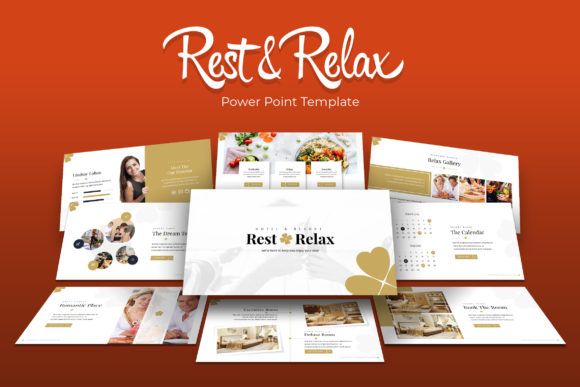
Rest Relax Power Point Template
The Rest Relax Power Point Template is a presentation design system built around calm, clear, and visually balanced layouts. It is intended for users who need to communicate ideas without visual clutter, while still having access to a substantial library of slides. With 150 total slides distributed across five distinct color variations—each variation offering 30 slides—the template provides a structured yet flexible foundation for a wide range of presentation types. The design emphasizes ease of use through master slides, resizable graphics, picture placeholders with drag-and-drop functionality, and handcrafted infographics. Understanding what this template offers, and where its strengths and limitations lie, can help you decide whether it aligns with the goals of your next presentation project.
What the Rest Relax Power Point Template Provides
At its core, the Rest Relax Power Point Template is a collection of five separate PPTX files, each featuring a different premade color scheme. Every file contains 30 slides, giving you 150 total slides across the full set. The slides are built on master slides, which means changes made to the master layout automatically update all slides derived from it. This can save time when you need to apply consistent branding or formatting across an entire deck. The template also includes section break slides, a gallery slide, and a portfolio slide, which are useful for organizing content in longer presentations.
Graphics in the template are described as pixel-perfect illustrations, and they are resizable and editable without losing quality. Picture placeholders allow you to insert your own images simply by dragging and dropping. The template also includes handcrafted infographics, which can help you present data or processes in a more visual way. The download package provides a Readme file with a link to the free fonts used, so you can match the typography exactly as shown in the previews.
Why Someone Might Consider This Template
If you are preparing a presentation that requires a calm, professional tone—such as a wellness workshop, a corporate retreat briefing, a health services overview, or a mindfulness seminar—the Rest Relax Power Point Template may be a natural fit. Its design language avoids aggressive colors or busy layouts, which can help maintain audience focus on the content rather than on the slide design itself.
Another reason to consider this template is its scale. Having 150 slides across five color variations means you are not limited to a single look. You can choose the color scheme that best matches your organization’s branding or the mood of your event. The five options also allow you to switch between variants for different sections of a larger presentation, while still keeping a consistent structural feel.
The inclusion of handcrafted infographics is a practical advantage if your presentation involves data, comparisons, or step-by-step processes. Instead of building these visual elements from scratch, you can adapt the provided graphics to your own numbers and text. Similarly, the gallery and portfolio slides are helpful if your presentation includes case studies, project showcases, or team introductions.
Benefits
- Time efficiency. Master slides and drag-and-drop picture placeholders reduce the time spent on formatting. Once you set up your master slide, all slides update automatically, which is useful when you need to make last-minute changes to headers, footers, or background elements.
- Visual consistency. Because all five color variations come from the same design system, you can mix and match slides without creating a jarring visual shift. The handcrafted infographics and illustrations follow the same style across all variants.
- Flexibility for non-designers. If you do not have a background in graphic design, the template gives you a professional starting point. The resizable graphics and editable elements allow you to make adjustments without worrying about pixelation or alignment issues.
- Offline usability. Once downloaded, the PPTX files are fully yours to edit in PowerPoint. You do not need an internet connection or a subscription service to use them, which can be important in environments with limited connectivity.
Tradeoffs and Considerations
- No included photographs. The preview images in the template showcase are not part of the download. You will need to supply your own photos or source them separately. This is standard for many presentation templates, but it is worth noting because the final look of your slides will depend on the quality and style of the images you add.
- Limited to five color schemes. While five variations offer choice, they may not match every brand’s exact color palette. If your organization has a strict color system that falls outside the five options, you may need to customize the template further, which could require some manual adjustment.
- PowerPoint-specific format. The template is built for PowerPoint (PPTX). If your team uses Google Slides, Keynote, or another platform, you will need to convert the files, which can sometimes cause formatting shifts. The degree of compatibility depends on the complexity of the slides and the conversion method used.
- Slide count per variation. Each of the five color variants contains 30 slides. For a very short presentation (10–12 slides), you may find yourself picking and choosing which slides to keep, which is manageable but means you will not use the full set. For very long presentations (60+ slides), you may need to combine slides from different color variants, which could require some design harmonization if the color schemes differ significantly.
Scenarios Where This Template Is a Strong Fit
- Wellness, healthcare, or lifestyle presentations. The calm visual tone aligns well with topics related to rest, relaxation, mental health, nutrition, or self-care. The template’s name itself suggests a focus on these areas.
- Corporate retreats or team offsites. When presenting to colleagues in a less formal setting, the relaxed design helps maintain a constructive atmosphere without feeling overly stiff or corporate.
- Educational workshops on mindfulness or stress management. Participants in these settings often respond better to visuals that feel open and uncluttered. The handcrafted infographics can also simplify concepts like breathing exercises or habit tracking.
- Portfolio or gallery showcases. If you need to present a collection of work, client testimonials, or project examples, the dedicated gallery and portfolio slides provide a ready-made structure.
Scenarios Where Alternatives May Be Worth Considering
- High-impact sales or investor pitches. These presentations often benefit from bold, high-contrast design elements and strong calls to action. The Rest Relax Power Point Template’s subdued aesthetic may not create the urgency or excitement that some sales decks require.
- Data-heavy analytical reports. While the template includes infographics, its overall layout is not optimized for dense data tables, complex charts, or detailed financial models. If your presentation contains many numbers and technical details, a template with more robust charting options or a dashboard-style layout might serve you better.
- Entertainment or creative industries. If your work involves vibrant visuals, avant-garde design, or bold typography, the restrained look of this template could feel limiting. A template with more dynamic layouts and a wider color range might be a better match.
- Team collaboration on multiple platforms. If your team uses Google Slides or Keynote as their primary tool and does not have easy access to PowerPoint, you may encounter friction when editing or converting the PPTX files. In that case, a template designed natively for your platform could be simpler to manage.
Practical Decision-Making Insights
When evaluating the Rest Relax Power Point Template, start by matching its design style to the tone of your content. If your presentation is meant to inform, educate, or inspire in a calm and professional manner, this template provides a solid base. Next, consider the color options against your brand guidelines. If one of the five premade colors is a close match, you can use it with minimal adjustments. If not, you will need to budget time for customizing colors on key slides.
Also, think about your team’s technical comfort level. The template is designed to be accessible to non-designers, but making substantial changes beyond the provided structure—such as creating new slide layouts from scratch—may still require a basic understanding of PowerPoint’s master slide tools. If your team has limited PowerPoint experience, the built-in master slides and placeholders will be a help, not a hindrance.
Finally, factor in the time you have to source or create your own images. Since photographs are not included, your own choice of imagery will significantly affect the final look. If you have a library of high-quality photos that match the template’s calm aesthetic, the combination can be very effective. If you will need to purchase stock images or create graphics, account for that cost and time in your planning.
Determining Whether This Template Aligns with Your Goals
To decide whether the Rest Relax Power Point Template is the right choice, ask yourself three questions. First, does the design style support the message you want to convey? If your content is serious, sensitive, or reflective, the answer is likely yes. Second, do you need a large slide library that offers multiple color paths within a unified design system? If you are building a multi-section presentation that requires variety without losing coherence, the 150 slides across five colors give you that flexibility. Third, are you prepared to provide your own images? If you have access to suitable photographs or are comfortable using placeholder icons and illustrations, the template can stand on its own. If you rely on the preview images to sell the look, you may need to adjust your expectations.
No single template works perfectly in every situation. The Rest Relax Power Point Template excels in contexts where clarity, calm, and consistency matter more than high-energy visuals. By weighing its benefits against its limitations and considering your specific presentation needs, you can make an informed choice that saves you time and helps your content connect with your audience.