How a Ladies Bag Sale Social Media Post Template Simplifies Promotions
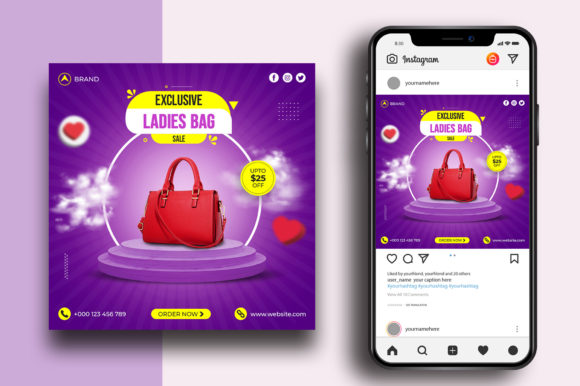
Running a bag sale—whether for a boutique, a seasonal clearance, or a new collection launch—demands visual content that stops the scroll. Crafting each post from scratch, however, eats into time that could be spent on inventory, customer service, or strategy. This is where a dedicated Ladies Bag Sale Social Media Post template enters the picture. Designed specifically for bag promotions, this type of asset aims to reduce design overhead while maintaining a polished, on-brand appearance. But does it deliver in practice? Let's examine what this template actually offers, who it helps most, and where its limitations lie.
What a Ladies Bag Sale Social Media Post Template Actually Is
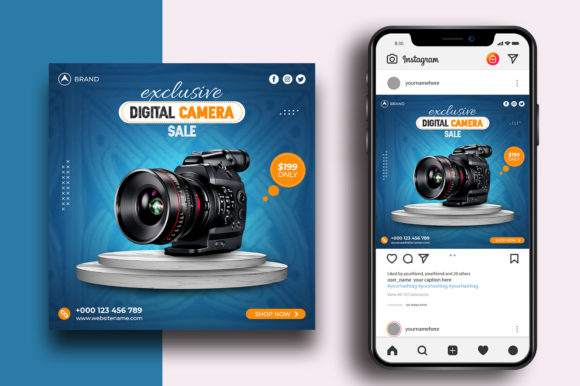
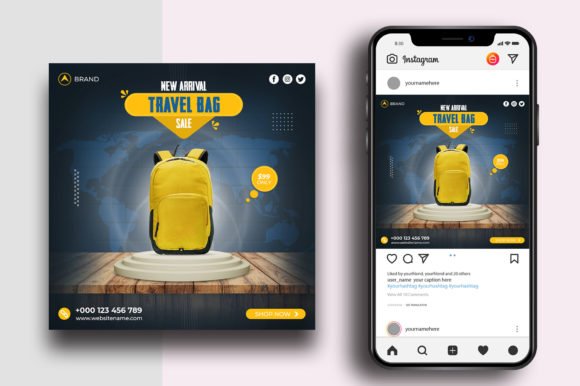
At its core, this template is a layered Photoshop file (PSD) optimized for a 1080×1080 pixel square format—the standard for Instagram feeds, Facebook posts, and many other social platforms. The file comes pre-configured with a 300 DPI resolution and RGB color mode, which means it prints cleanly if needed and displays accurately on screens. The design elements, text layers, and layout are all editable, so you can swap imagery, change the sale copy, and adjust colors without rebuilding the graphic from zero.
What makes this template worth discussing is its focus on a specific product category: ladies' bags. Instead of a generic sale post that requires heavy customization to feel relevant, this asset is built around the visual language of handbags, totes, clutches, and related accessories. The layout, typography choices, and spacing are tailored to highlight product photography and pricing information in a way that feels natural for this niche.
Optimized for Quick Edits
The template promises easy editing, and that claim holds up well for anyone with basic Photoshop skills. Text layers are clearly labeled, so changing the sale headline, discount percentage, or call-to-action takes seconds. The file structure is straightforward—typically a background layer, an image placeholder, and text overlays. For a small business owner or a marketer who is not a professional designer, this reduces the learning curve dramatically.
Resolution and Color Accuracy
Working at 300 DPI in RGB mode is a deliberate choice. Social platforms compress images heavily, but starting with a high-resolution source file helps retain sharpness in the final export. The RGB color space aligns with screen display, so the handbag photos you insert will look closer to what you see on your monitor. This matters when a deep burgundy tote or a metallic clutch needs to read as rich and accurate on mobile screens.
Square Format for Versatility
1080×1080 pixels remains the sweet spot for Instagram feed posts, Facebook ads, and Pinterest pins. While Stories and Reels require different aspect ratios, this square format works across multiple channels without cropping issues. If you reuse the template for a Facebook event cover or a Twitter promotion, the square frame adapts reasonably well with minor adjustments.
Free Font Use
Many template sellers bundle fonts that require separate licensing. This template specifies free font use, which is a practical advantage. You can download the recommended typefaces without additional cost, and because they are freely available, anyone on your team can replicate the look without licensing headaches. This also makes future edits more sustainable—you are not locked into a paid font that may expire or require renewal.
How It Performs in Real-World Use
In practice, this template shines when you need to produce a series of bag sale posts quickly. Imagine a weekend flash sale where you want to feature five different handbag styles, each with its own price and discount. Instead of designing each post individually, you open the PSD, swap the product image, update the price text, and export. For a small e-commerce team, this can cut design time from 20 minutes per post to under five.
The template also supports consistency. When every post shares the same layout, color palette, and typography, your feed starts to look cohesive. Followers scrolling past will immediately recognize your brand voice, which builds familiarity and trust. For a bag sale, this visual repetition can reinforce the promotion's urgency—customers see the same frame repeated with different products, and the message sticks.
One limitation worth noting: the template does not include images. You need your own product photography or stock images of handbags. If your photo library is sparse or low-quality, the template cannot compensate. The design framework is only as strong as the visuals you drop into it. Similarly, while the PSD is optimized for Photoshop, users on free or alternative editors (like GIMP or Photopea) may encounter layer compatibility issues. The file is built for Photoshop, and that is where it performs best.
Build Quality and Flexibility
The PSD file is structured for clarity. Well-organized layer groups, descriptive layer names, and non-destructive smart objects (if included) make it easy to experiment without breaking the design. The RGB/300 DPI combination ensures that exports look crisp whether you save as PNG for social or JPEG for email newsletters. Over a year of running seasonal bag sales, you could reuse this template dozens of times, changing only the imagery and copy.
Consistency in Branding
Consistency is often the invisible driver of effective social media marketing. A template like this enforces a consistent frame size, font hierarchy, and color usage across all posts. If you maintain a brand style guide, you can adjust the template once (swap the background color or accent hue) and then lock it as your standard bag sale layout. From there, every new promotion builds on the same visual identity.
Reliability Across Platforms
Because the template outputs at the standard square size, it uploads cleanly to Instagram, Facebook, and LinkedIn. No unexpected cropping or awkward margins. For platforms that support alternative dimensions, you can tweak the canvas size in Photoshop while keeping the core design intact. The 300 DPI baseline also means that if you ever need to print a flyer or a small poster for in-store signage, the file is already print-ready at a reasonable size.
Small Business Owners and Boutique Operators
If you run a handbag boutique, a consignment shop, or an online store specializing in women's accessories, this template directly addresses your daily need for promotional visuals. You likely handle multiple sales events per quarter—seasonal clearances, new arrivals, holiday specials. Having a reliable template saves you from outsourcing each post to a designer or spending hours in Canva trying to replicate a consistent look.
Freelance Social Media Managers
For freelancers managing multiple retail clients, efficiency is everything. A ready-made template for bag sales cuts down turnaround time for client approval. You can present a polished proof, make small adjustments, and deliver the final set of posts quickly. The free font requirement also means you avoid licensing disputes when handing off files to clients.
Marketers Running Flash Sales or Seasonal Campaigns
Time-sensitive promotions demand speed. If you are launching a 48-hour bag sale, you do not want to fiddle with alignment or color matching. The template lets you focus on the message—discount percentages, product highlights, and the call-to-action—while the design framework handles the visual fundamentals. This speed can directly impact sales when every hour of promotion counts.
Educators and Content Creators
Bloggers, educators, and course creators covering fashion retail, social media marketing, or e-commerce operations can use this template as a teaching example. It illustrates how a niche-specific design asset reduces friction in content production. You could also use it to demonstrate layering, text styling, and export workflows in Photoshop tutorials.
Practical Recommendations for Getting the Most Out of the Template
- Invest in strong product photography. Since images are not included, your bag photos determine the post's impact. Use natural lighting, clean backgrounds, and multiple angles. A single hero shot per post usually works best with this layout.
- Customize the color palette to match your brand. Even small adjustments—like changing the accent color to your brand hue—make the template feel like your own. This takes under a minute and pays off in brand recognition.
- Keep your text concise. The template's layout is designed for short headlines and clear pricing. Avoid cramming multiple product details into one post. Use the image to show the bag and the text to state the deal.
- Plan a series of posts in advance. Open the template, create placeholder copies for each bag you want to feature, and produce the entire set in one sitting. This batch workflow maximizes the template's efficiency.
- Export at highest quality. When saving from Photoshop, choose PNG-24 or high-quality JPEG. The 300 DPI source ensures clean exports, but low compression settings can still degrade image quality.
Limitations and Considerations
No template is a silver bullet. The most significant limitation is the dependency on Photoshop. If your workflow relies on free tools or browser-based editors, you may struggle with layer compatibility or missing smart object functionality. Additionally, because the template is designed for a square format, it will not directly adapt to vertical Stories or horizontal video ads without manual resizing. You may need to create derivative versions for those placements.
Another nuance: the aesthetic of the template may not suit every brand voice. If your boutique leans minimal and monochrome, a heavily stylized template with decorative elements could feel mismatched. Always review the preview images carefully before purchasing to confirm the design direction aligns with your visual identity. When the style fits, the template becomes a seamless extension of your brand. When it does not, every post will feel slightly off.
Final Perspective on Value
A Ladies Bag Sale Social Media Post template is not a substitute for a full brand strategy or a professional designer for large-scale campaigns. What it does offer is a reliable, time-saving framework for producing consistent promotional graphics for bag sales. For small businesses, freelancers, and marketers who regularly post about handbags and accessories, this kind of template reduces friction in content creation and helps maintain a cohesive visual presence across social channels. The value lies in its specificity—it is built for one product category and does that job well. If your sales calendar includes regular bag promotions, and you have basic Photoshop skills, this asset can become a repeatable tool in your marketing workflow.